Dynamic Product Ads - Video
It's possible to supply a video asset for Dynamic Product Ads, in this scenario the product is referred to as Product Level Video Ads (PLV). When Dynamic Product Ads are fetching a video resource from a product feed a specific set up is needed.
Overview
Product Level Video Ads are dependent on a new attribute named preferred_video_tags at the Dynamic Template level, this attribute allows the user to specify a tag for the column in which a video can be found for a product. When a preferred video tag is provided on a Creative, Snap will acknowledge Product Level Video media for the ad and look for the corresponding video tag in the product.
The new attribute preferred_video_tags works alongside the existing preferred_image_tags to create a fallback logic. The fallback logic allows advertisers to serve a 1:1 image in those cases where a video is not present for a product, this may be when there is a mix of video and non-video media available for products in the same product set, or when a video has failed to ingest.
Dynamic Product Ads - additions and requirements
Product level video ads build on the current Dynamic Product Ads that Snap offers and many entities remain the same, there has however been an introduction of some new attributes.
| Entity | Description |
|---|---|
| Catalog | vertical value is required to be COMMERCE, other vertical values are not supported for PLV at this time. |
| Product feed | New columns introduced video[x].url and video[x].tag[0] |
| Ad Squad | - |
| Ad | Types supported are REMOTE_WEBPAGE, APP_INSTALL, DEEP_LINK |
| Creative | Types supported are WEB_VIEW, APP_INSTALL, DEEP_LINK |
| Dynamic Template | New attribute preferred_video_tags introduced, layout value is required to be AUTOMATIC, other layout values are not supported for PLV |
Preview Options
Product Level Video Ads can be previewed several different ways, if you wish to use the Creative Preview API to allow users to preview the Creative in your own application you can obtain the API reference document for the Creative Preview API by speaking to your named contact at Snap.
| Preview | Availability |
|---|---|
| Creative Preview API - Preview via Creative ID | ✅ |
Creative Preview API - Preview via JSon Product Set signature token, this requires use of the new attribute preferred_video_tags | ✅ |
| Snap Ads Manager (ads.snapchat.com) | ✅ |
| Snapcode Preview (ads manager / marketing API) | ✅ |
Video file specifications
Video file specifications:
- Max file size of 1GB
- Dimensions: min width: 1080 , min Height: 1920
- Max Duration : 180 seconds
- Min Duration: 3 seconds
- .mp4 or .mov and H.264 encoded
Catalog Setup
Within the catalog, advertisers can provide one video per product using the video column in the product feed, video can have up to 20 tag columns that map to the video.
| Product Feed Column | Value | Description |
|---|---|---|
| video[0].url | https://developers.snap.com/assets/images/spectacles-original.mov | url to be rendered when tag[0] or tag[1] is specified |
| video[0].tag[0] | spectacles_hand | tag that maps to video[0] |
| video[0].tag[1] | spectacles_vid | tag that maps to video[0] |
| video[0].tag[...] | … | … |
| video[0].tag[19] | spectacles_chrome | tag that maps to video[0] |
Product Search
The product search method can be used to verify that Video and Image media provided via the Product Feed has been ingested.
Video media stored in the video[x].url column is returned as video_media , currently there can only be one video[x].url column per product, this column can have 20 individual video[x].tag[y] entries.
The video_media node contains url, tags, internal_url_status and internal_url
url- This is a reference to the url where the advertiser CDN where the video is to be fetched fromtags- This is a reference to the tags associated with the video, there may be up to 20 entries pervideo_mediainternal_url_success- This attribute indicates whether the video was ingested and passed reviewinternal_url- This is a reference to the Snap CDN where the file is stored
Image media stored in the image[x].url column is returned as additional_media, there can be up to 20 individual image[x].url columns per product, each one of these can have up to 20 individual image[x].tag[y] entries
Example - Product Search
This product search surfaces the video_media node for the products within the Product Set, it also surfaces the additional_media which are additional images.
POST https://adsapi.snapchat.com/v1/catalogs/ff69a16b-2800-413c-ba2e-23254a3dd353/product_search?limit=100
Body:
{
  "filter": {
    "AND": [
      {
        "PRODUCT_SET_ID": {
          "EQ": "6b6d7998-1d02-431c-9d18-107cff522c0d"
        }
      },
      {
        "PRODUCT_STATUS": {
          "EQ": "COMPLETE"
        }
      }
    ]
  }
}
Response:
{
  "sub_request_status": "SUCCESS",
  "product": {
    "id": "8888451630972582630",
    "external_id": "sp-100",
    "catalog_id": "ff69a16b-2800-413c-ba2e-23254a3dd353",
    "title": "Spectacles 3",
    "description": "Capture your world in 3D. Relive it with your 3D Viewer.",
    "link": "https://www.spectacles.com/",
    "image_link": "https://developers.snap.com/assets/images/white-bg-spectacles3-1020x1020.jpg",
    "image_media_status": "SUCCESS",
    "image_media_link": "https://cf-st.sc-cdn.net/d/lJzpZ6DPTSse3w4Z9okoc.1023?mo=GhUaCTIBBEgCUAZgAaIBBwj_ByICEgA%3D&uc=6",
    "availability": "in stock",
    "google_product_category": "Electronics > Communications > Telephony > Mobile Phones",
    "product_type": "wearables",
    "brand": "Spectacles",
    "gtin": "10012345678905",
    "mpn": "10012345678905",
    "condition": "new",
    "item_group_id": "spectacles_100",
    "custom_label_0": "video",
    "price": {
      "value": "330.00",
      "currency": "USD"
    },
    "created_at": "2025-10-03T13:07:35.217989621Z",
    "updated_at": "2025-10-03T13:07:35.217995261Z",
    "feed_id": "153256b3-be2e-4ad5-87e3-b63f56819161",
    "main_media": {
      "url": "https://developers.snap.com/assets/images/white-bg-spectacles3-1020x1020.jpg",
      "internal_url": "https://cf-st.sc-cdn.net/d/lJzpZ6DPTSse3w4Z9okoc.1023?mo=GhUaCTIBBEgCUAZgAaIBBwj_ByICEgA%3D&uc=6",
      "internal_url_status": "SUCCESS"
    },
    "icon_media": {},
    "additional_media": [
      {
        "url": "https://developers.snap.com/assets/images/spectacles3-1020x1020.jpg",
        "tags": [
          "domino_yellow_bg"
        ],
        "internal_url": "https://cf-st.sc-cdn.net/d/9yDUbvzG125tVW9s3nEea.1023?mo=GhUaCTIBBEgCUAZgAaIBBwj_ByICEgA%3D&uc=6",
        "internal_url_status": "SUCCESS"
      }
    ],
    "video_media": [
      {
        "url": "https://developers.snap.com/assets/images/spectacles-original.mov",
        "tags": [
          "yellow_demo"
        ],
        "internal_url": "https://cf-st.sc-cdn.net/d/ydq8J9ajuFkNLaSi6k6aN.67?mo=GowCGgkyAQRIAlB5YAFaCEFkc01lZGlhogEtCEMSJQojCKbVHiABMOADONQGQAFKDgoJNyQpJCUpJBwaEPQDUMw6aAIiAhIAogEuCLoKEiUKIwiukRQgATDQBTiACkACSg4KCSsWFhkZHBUVEBD0A1DMOmgCIgISAKIBLQh_EiUKIwicoRAgATDgAzjUBkACSg4KCSESEhQTGBQODxD0A1DMOmaCIgISAKIBLgiSChIlCiMIx60RIAEw4AM41AZAAkoOCgkiExMVFhoVDxAQ9ANQzDpoAiICEgCiAS4I0goSJQojCNrRDiABMOADONQGQAJKDgoJIg8QERMUEA8LEPQDUMw6aAIiAhIAkAPMOg%3D%3D&uc=121",
        "internal_url_status": "SUCCESS"
      }
    ]
  }
}
...
Dynamic Template Setup and Ad serving logic
A minimum of two different attributes (“layout”:”AUTOMATIC” and preferred_video_tags) are required for the Dynamic Template entity in order to use Product level video ads, however it’s possible to also include preferred image tags (preferred_image_tags) to set a fallback to an image in case a video is not present for the product in question.
Layout
Product level videos require the Automatic layout (“layout”:”AUTOMATIC”), any other layouts (FILL_WIDTH, FILL_HEIGHT, FIT etc) will not surface a product video despite the presence of preferred video tags in the catalog and preferred video tags in the Dynamic Template.
Preferred Video Tags
To surface a video in ads it’s a requirement to use Preferred video tags (preferred_video_tags) , this attribute contains one or more tags referring to videos, listed in the priority that they should be used.
Right now it’s only possible for a product feed to have one video per product, that video can have up to 20 tags.
Preferred Image Tags
Using preferred image tags (preferred_image_tags) is optional, if they are present in the dynamic template a fallback logic will look for the image(s) referred to in the preferred image tags if the intended Video media is not available.
If an image is used the style of the Ad will use the new 1:1 ratio for Single Product ads which Snap introduced in Q3.
Ad serving - Fallback logic
At the point of serving our algorithm will follow this logic:
- Check the first tag in preferred video tags (
preferred_video_tags) and look for a corresponding video in the catalog, if the video is found it will be served in the ad unit at 9:16 ratio (full screen video). Note that at this time you can only list one video in the product feed. - If the video listed in
preferred_video_tagsisn’t found, the algorithm will instead check the preferred image tags (preferred_image_tags), the first image found in the product feed will be served in the ad unit at 1:1 ratio. - If no image listed in
preferred_image_tagscan be found, the algorithm will instead default to the main image (image_link) in the product feed, this will be served in the ad unit at 1:1 ratio.
Ad serving - Fallback legend
| Priority | Logic | Type | Media Ratio |
|---|---|---|---|
| 1 | video[x].url as defined by tags listed in preferred_video_tag | Video | 9:16 |
| 2 | image[x].url as defined by tags listed in preferred_image_tag | Image | 1:1 |
| 3 | image_link - the main image listed in the product catalog | Image | 1:1 |
Example - Product feed and Dynamic Template
Here is a product feed that makes use of both videos and images, and a Dynamic Template configuration that makes use of both preferred video tags and preferred image tags.
| id | title | image_link | price | availability | video[0].url | video[0].tag[0] | image[0].url | image[0].tag[0] |
|---|---|---|---|---|---|---|---|---|
| A001 | Spectacles Classic | https://developers.snap.com/assets/images/white-bg-spectacles3-1020x1020.jpg | 150 | IN_STOCK | https://developers.snap.com/assets/images//spectacles-original.mov | spectacles_hand | https://developers.snap.com/assets/images/spectacles3-1020x1020.jpg | spectacles_friday |
| A002 | Spectacles Charger | https://https://developers.snap.com/assets/images/white-bg-cable1020x1020.png | 45 | IN_STOCK | https://developers.snap.com/assets/images/spectacles-cable.mov | spectacles_hand | https://developers.snap.com/assets/images/charging-cable-1020x1020.jpg | spectacles_friday |
Example - Dynamic Template with Preferred Video Tags
The below Dynamic Template uses preferred_video_tags and preferred_image_tags, the order of preference would be to first use the tag found in preferred_video_tags, if that video does not exist the entries in the preferred_image_tags would be used. If there is no matching image for the preferred_image_tags the ad would default to the image_link.
{
  "dynamic_template": {
    "name": "Dynamic Template for Domino Collection Ad",
    "ad_account_id": "497979f0-ed17-4971-8288-054883f1cbca",
    "ios_url": "https://ads-interfaces.sc-cdn.net/adformats/templates/V2/index.html",
    "android_url": "https://ads-interfaces.sc-cdn.net/adformats/templates/V2/index.html",
    "layout": "AUTOMATIC",
    "text_fields": ["", ""],
    "preferred_video_tags": ["spectacles_hand"],
    "preferred_image_tags": ["spectacles_friday"]
  }
}
| Product Video | Product Image | Main image | |
|---|---|---|---|
| Scenario | Product A001 is selected to be served to the user. Video in product feed is matched with tag from preferred_video_tags , the resulting ad shows a product video in 9:16 ratio with a profile overlay at the bottom. | Product A001 is selected to be served to the user. Video is not found in the product feed, image is matched via preferred_image_tags. The resulting ad shows a product image in 1:1 ratio. | Product A001 is selected to be served to the user. Neither video or images can be matched, logic defaults to image_link. The resulting ad shows product image in 1:1 ratio. |
| What the user will see | 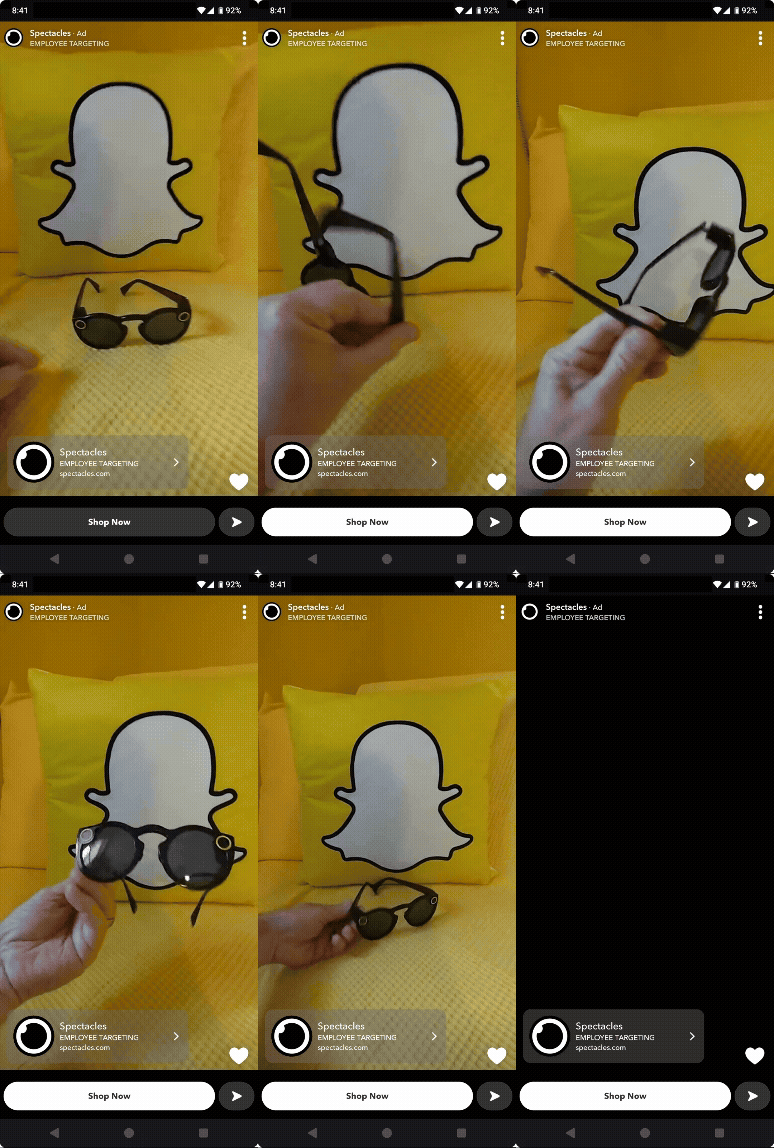 | 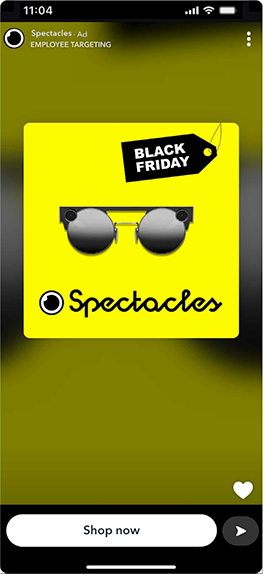 | 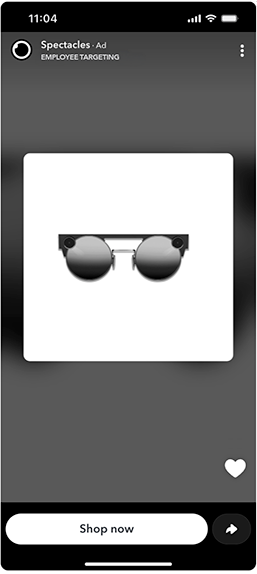 |
Images/Videos may not be an exact likeness, ratios and distances will vary from device to device