Remote API
Overview
The Camera Kit Web SDK enables the host application to send data from the app to the Lens to create customized experiences. For example, this could include passing sports score data or news headlines for a Lens to display, award points in your app based on user interactions within a Lens, or events based on user input to better track Lens performance. This guide walks through the different options for communication between a Lens and the host application to help tailor the experience to match the desired use case.
How It Works
Remote API can be used to send data including images, 3D models, and other data to and from the Lens, allowing the Lens to adapt to changing information from the application in real-time. This feature requires a RemoteServicesModule API Spec within the Lens, the steps to create the API Spec are below. Note that while the setup for this option relies on Snap’s Remote API system, all communication is sent directly between the host app and Lens without a Snap server involved.
Remote APIs require that all communication between the Lens and the host application needs to be initiated by the Lens. That is, the Lens will send requests to the host application and the host application will respond. If your use case requires the app to be able to send information to the Lens at any time, the recommended path is to send a request from the Lens when the Lens is first applied and respond from the app when needed.
Creating an API Spec
- Open the my-lenses.snapchat.com/apis
Any account that is tied to a Camera Kit organization has access to the API spec portal within My Lenses. If you do not have access, confirm your account and organization settings.
-
Select Add API:

-
Fill out the fields with your corresponding information and be sure to set the target platform field to CAMERA_KIT then select Next
-
Select Add Endpoint to create a new endpoint and set any parameters needed for this endpoint:
- Make note of the generated Spec ID as it will need to be supplied into your applications to authorize the communication from the Lens.
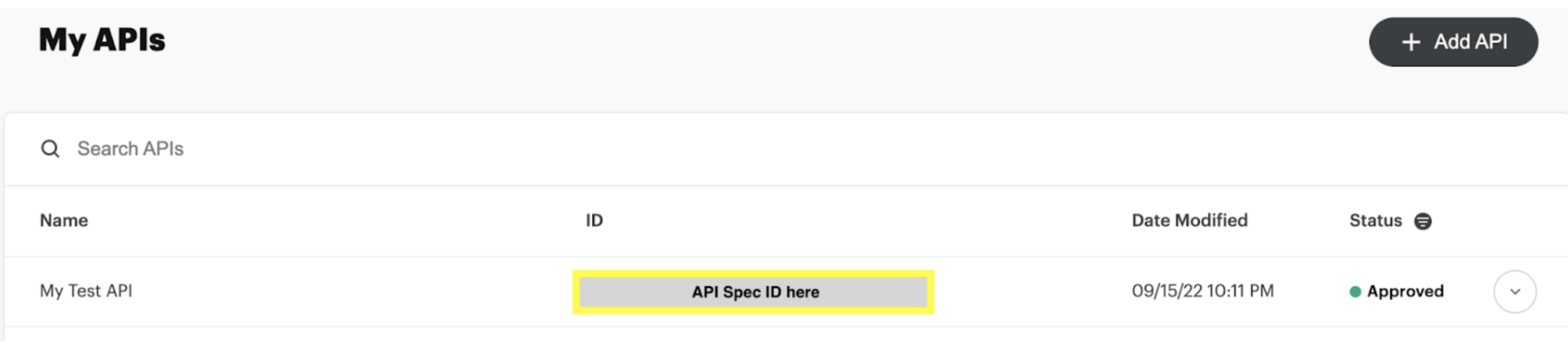
- Once the spec has been created and approved, open Lens Studio
Using API Spec in Lens Studio
If you wish to test out the functionality before creating a spec, the Placeholder API spec can be used. This can be found in the Asset Library starting in Lens Studio 4.19 and imported using the same process as you would for your own spec below. The specID for the Placeholder spec is: 363ee2a5-ad35-4a5f-9547-d42b2c60a927
-
Open Lens Studio and login to My Lenses using the same account you used to create the spec in the Creating an API Spec section above.
-
Open the current project or create a new project.
-
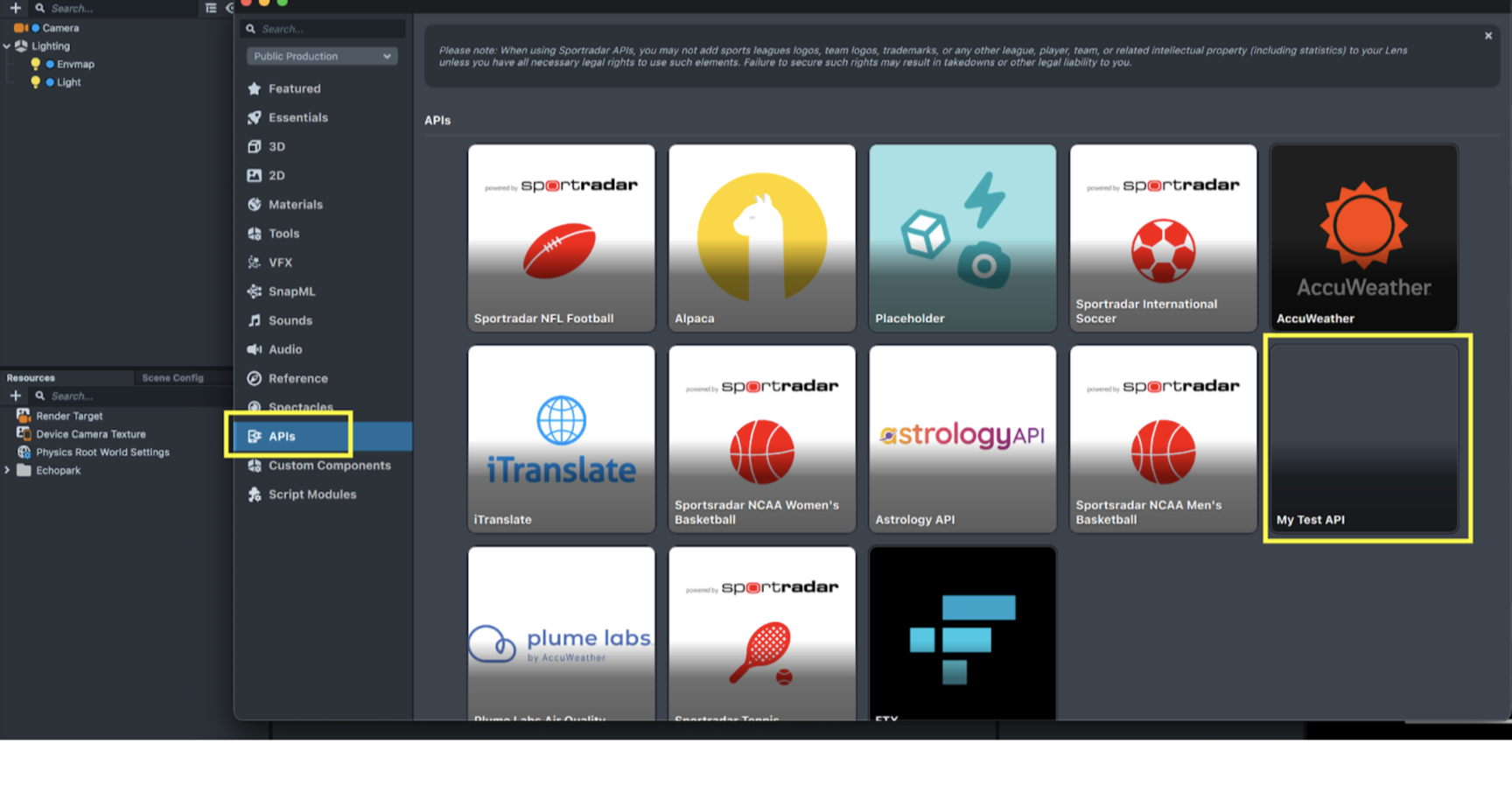
Open the Asset Library, select APIs, and select the API that you have setup.
-
Select Import, note that some restrictions apply when using Remote API. This will import a Remote Services Module asset and an example js script for how to use the calls
-
Create the rest of your Lens
For a detailed walkthrough of the process please check out this video.
Lens Studio Best Practices for Remote APIs
Generated Script
It is recommended to not make changes to the generated script and instead reference these functions via script.api from other scripts. This will ensure that you do not lose progress or need to manually merge changes if you need to alter the spec and reimport at a later time.
Testing and Debugging
Since this API spec is set up for communication between the host application and the Lens, there is no actual remote service to respond to the Lens’ requests. This means that the performAPIRequest methods will fail when testing in Lens Studio. As a result, checking response.statusCode in Lens Studio will return an error value and when testing this within a Camera Kit app, anything other than 1 is an error.
To workaround this issue, here are a few testing scenarios to ensure the communication flow is working properly.
Push-To-Device
Push-To-Device from Lens Studio can be configured to send the Lens to your Camera Kit application and enable testing with the actual responses from the app. Push-To-Device will need to be configured within the app and steps to do this can be found on the In App Lens Testing page
Debug Responses
For testing within Lens Studio, the recommended path is to create a debug js script which will simulate the responses to your API requests. This allows the Lens creator to ensure the logic and flow in the Lens are correct before needing to test the Remote API data with the app.
For example:
// DebugResponse.js
//@input  bool useDebug;
global.useDebug = script.useDebug;

global.initResponse = {
    name: “debugName”
    // ..
}
Then for the request code:
function handleInitResponse(responseJSON) {
  // ..
}

script.api.initRequest = function () {
  if (global.useDebug) {
    handleInitResponse(global.initResponse);
  } else {
    // perform the actual request
    var req = global.RemoteApiRequest.create();
    // ..
  }
};
Launch Data
Lenses can be launched with additional data to alter the state of the Lens. This data includes numbers, strings, or arrays of each. This functionality in Camera Kit is largely the same as launching a Lens via Snap Kit and a reference Lens and launch information can be found here
Launch data can be sent in the second argument of your session.applyLens call. Here is a sample app demonstrating how to use the launch data with the Web SDK.
Launch Parameters dynamic data input is limited to 3 KB
Remote API Examples
Cat Facts
This example is provided within the Camera Kit Sample App and can interact via the Cat Fact Lens, where every time the Lens is launched, it receives a new cat fact.
Web SDK Implementation
Reference code for sending cat facts to this Lens on Web can be found here
Lens Implementation
// @input Asset.RemoteServiceModule remoteServiceModule

function handleAPIResponse(response, callback) {
  if (response.statusCode !== 1) {
    print('ERROR: The API call did not succeed!. Please check your request');
    cb(true);
  } else {
    try {
      var parsedBody = JSON.parse(response.body);
      if (cb) {
        cb(false, parsedBody);
      }
    } catch (e) {
      print('ERROR: Failed to parse response');
      if (cb) {
        cb(true);
      }
    }
  }
}

script.api.fact = function (max_length, cb) {
  var req = global.RemoteApiRequest.create();
  req.endpoint = 'fact';
  req.parameters = {
    max_length: max_length,
  };
  script.remoteServiceModule.performApiRequest(req, function (response) {
    if (cb) {
      handleAPIResponse(response, cb);
    }
  });
};