

Edge Functions
This guide will show you how to configure and invoke an edge function. Edge Functions are serverless functions that execute in response to requests from a Lens. They are deployed at the "edge" of the network, meaning close to the user's geographical location. This proximity minimizes latency and improves performance for users accessing your Lens globally.
Before proceeding, first set up your project as per the Getting Started guide.
For full reference documentation refer to the Snap Cloud documentation site.
Configure an Edge Function
We'll start by configuring an edge function that adds two numbers together. Open the Snap Cloud Dashboard and navigate to the Edge Functions panel.
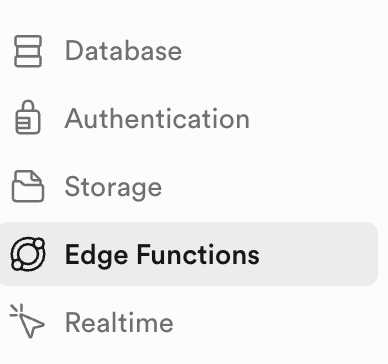
Click on Deploy a new function -> Via Editor.
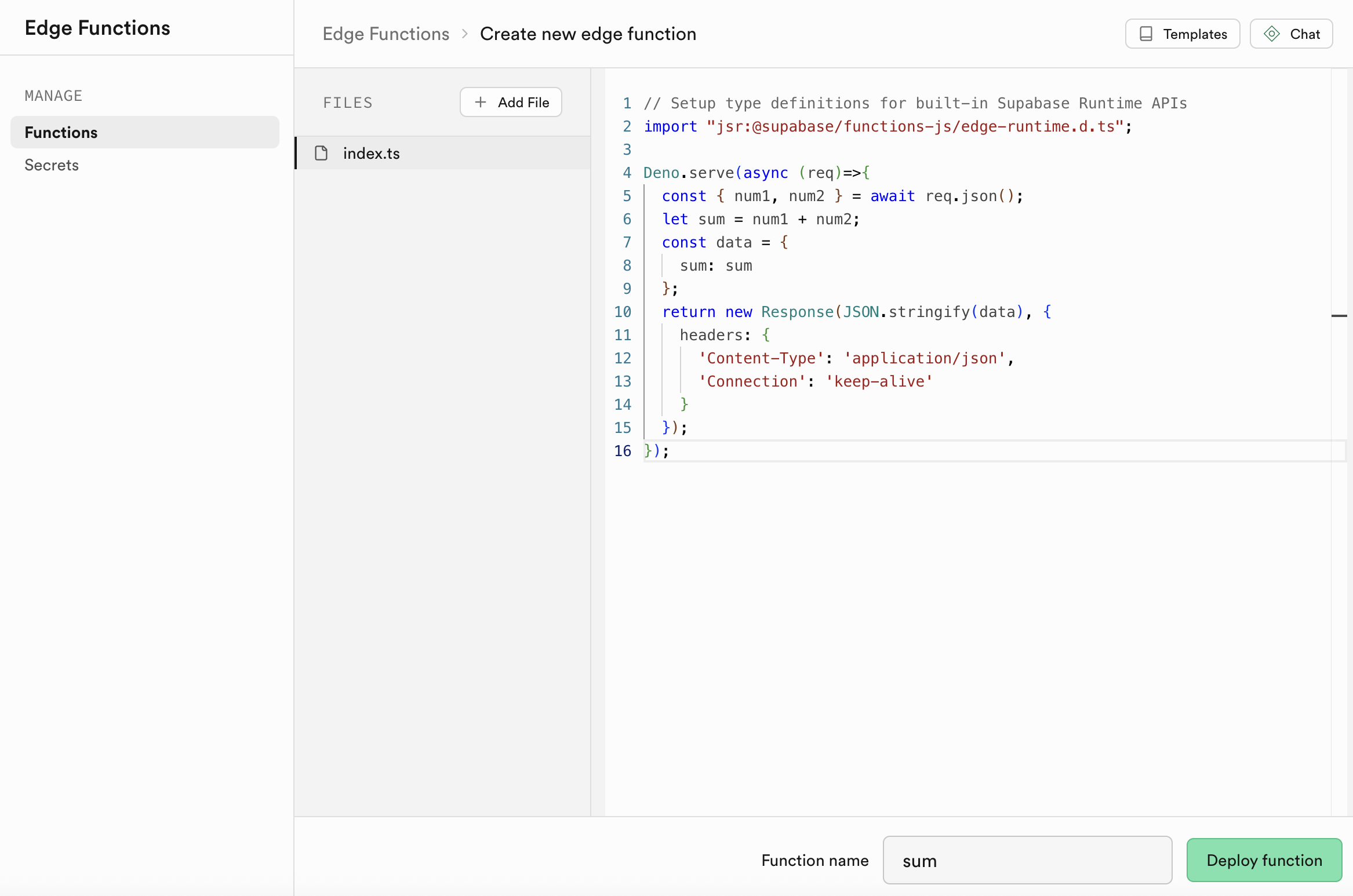
Edge functions are written in Typescript using Deno. You start by importing the Supabase Runtime. Then, implement the function in Deno.serve. The following example takes two numbers as input and returns their sum:
// Setup type definitions for built-in Supabase Runtime APIs
import 'jsr:@supabase/functions-js/edge-runtime.d.ts';

Deno.serve(async (req) => {
  const { num1, num2 } = await req.json();
  let sum = num1 + num2;
  const data = {
    sum: sum,
  };
  return new Response(JSON.stringify(data), {
    headers: {
      'Content-Type': 'application/json',
      Connection: 'keep-alive',
    },
  });
});
Copy this script into the function's code area. Name the function sum and click Deploy Function.
After deployment, the configuration page opens. Locate the Verify JWT with legacy secret option and turn it off. For more details, see the Snap Cloud API Keys guide.
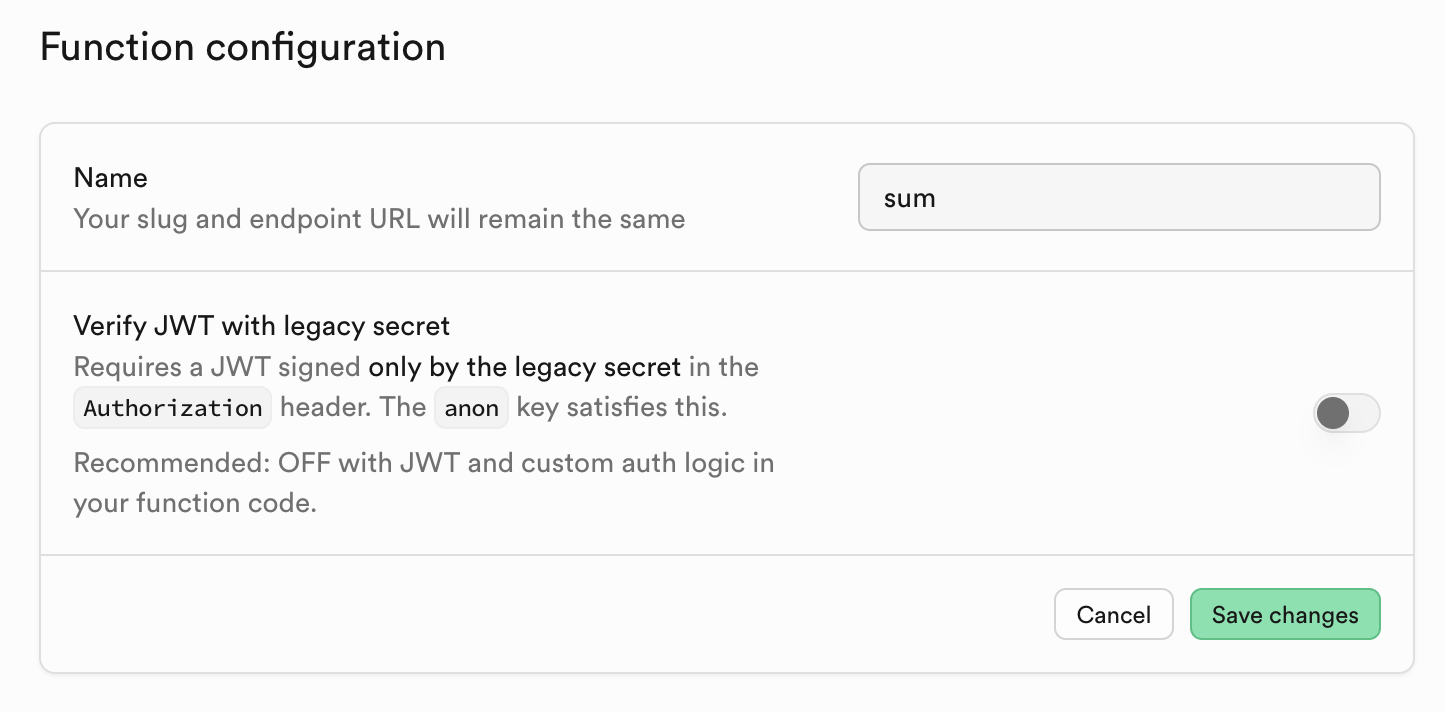
Click Save changes to apply the configuration.
Invoking an Edge Function
Back in Lens Studio, you can invoke the edge function using the Supabase client. The following complete example demonstrates how to call the sum function we just deployed and handle the response.
- TypeScript
- JavaScript
import {
  createClient,
  SupabaseClient,
} from 'SupabaseClient.lspkg/supabase-snapcloud';

@component
export class EdgeFunctionExample extends BaseScriptComponent {
  @input
  @hint('Supabase Project asset from Asset Browser')
  supabaseProject: SupabaseProject;

  @input
  @hint('Edge Function name deployed in your Supabase project')
  functionName: string = 'sum';

  @input
  @hint('First number to add')
  num1: number = 10;

  @input
  @hint('Second number to add')
  num2: number = 25;

  private client: SupabaseClient;
  private uid: string;

  onAwake() {
    this.createEvent('OnStartEvent').bind(() => {
      this.onStart();
    });
  }

  onStart() {
    this.initSupabase();
  }

  async initSupabase() {
    this.log('Initializing Supabase client...');

    const options = {
      realtime: {
        heartbeatIntervalMs: 2500,
      },
    };

    this.client = createClient(
      this.supabaseProject.url,
      this.supabaseProject.publicToken,
      options
    );

    if (this.client) {
      this.log('Client created successfully');
      await this.signInUser();

      if (this.uid) {
        this.log('Calling Edge Function...');
        await this.callEdgeFunction();
      }
    }
  }

  async signInUser() {
    this.log('Signing in user...');

    const { data, error } = await this.client.auth.signInWithIdToken({
      provider: 'snapchat',
      token: '',
    });

    if (error) {
      this.log('Sign in error: ' + JSON.stringify(error));
    } else {
      const { user, session } = data;
      this.uid = JSON.stringify(user.id).replace(/^"(.*)"$/, '$1');
      this.log('User authenticated');
    }
  }

  async callEdgeFunction() {
    this.log('--- EDGE FUNCTION EXAMPLE START ---');
    this.log('Calling function: ' + this.functionName);
    this.log('Input: num1=' + this.num1 + ', num2=' + this.num2);

    try {
      const { data, error } = await this.client.functions.invoke(
        this.functionName,
        {
          body: {
            num1: this.num1,
            num2: this.num2,
          },
        }
      );

      if (error) {
        this.log('FUNCTION CALL FAILED: ' + JSON.stringify(error));
        return;
      }

      if (data) {
        this.log('FUNCTION CALL SUCCESS');
        this.log('Result: ' + JSON.stringify(data));

        if (data.sum !== undefined) {
          const result = this.num1 + ' + ' + this.num2 + ' = ' + data.sum;
          this.log('Calculation: ' + result);
        }
      }
    } catch (err) {
      this.log('Exception calling function: ' + err);
    }

    this.log('--- EDGE FUNCTION EXAMPLE COMPLETE ---');
  }

  public async invokeFunction(fn: string, params: any) {
    if (!this.client) {
      this.log('Client not initialized');
      return null;
    }

    const { data, error } = await this.client.functions.invoke(fn, {
      body: params,
    });

    if (error) {
      this.log('Function error: ' + JSON.stringify(error));
      return null;
    }

    return data;
  }

  onDestroy() {
    if (this.client) {
      this.client.removeAllChannels();
    }
  }

  private log(message: string) {
    print('[EdgeFunctionExample] ' + message);
  }
}
// Import Supabase client
const createClient =
  require('SupabaseClient.lspkg/supabase-snapcloud').createClient;

//@input Asset.SupabaseProject supabaseProject {"hint":"Supabase Project asset from Asset Browser"}
//@input string functionName = "sum" {"hint":"Edge Function name deployed in your Supabase project"}
//@input float num1 = 10 {"hint":"First number to add"}
//@input float num2 = 25 {"hint":"Second number to add"}

/**
 * Edge Function Example (JavaScript version)
 * Shows how to invoke serverless Edge Functions deployed in Supabase
 */

var EdgeFunctionExampleJS = function () {
  this.client = null;
  this.uid = null;

  this.onAwake = function () {
    script.createEvent('OnStartEvent').bind(() => {
      this.onStart();
    });
  };

  this.onStart = function () {
    this.initSupabase();
  };

  this.initSupabase = async function () {
    this.log('Initializing Supabase client...');

    const options = {
      realtime: {
        heartbeatIntervalMs: 2500,
      },
    };

    this.client = createClient(
      script.supabaseProject.url,
      script.supabaseProject.publicToken,
      options
    );

    if (this.client) {
      this.log('Client created successfully');
      await this.signInUser();

      if (this.uid) {
        this.log('Calling Edge Function...');
        await this.callEdgeFunction();
      }
    }
  };

  this.signInUser = async function () {
    this.log('Signing in user...');

    const { data, error } = await this.client.auth.signInWithIdToken({
      provider: 'snapchat',
      token: '',
    });

    if (error) {
      this.log('Sign in error: ' + JSON.stringify(error));
    } else {
      const user = data.user;
      const session = data.session;
      this.uid = JSON.stringify(user.id).replace(/^"(.*)"$/, '$1');
      this.log('User authenticated');
    }
  };

  this.callEdgeFunction = async function () {
    this.log('--- EDGE FUNCTION EXAMPLE START ---');
    this.log('Calling function: ' + script.functionName);
    this.log('Input: num1=' + script.num1 + ', num2=' + script.num2);

    try {
      const { data, error } = await this.client.functions.invoke(
        script.functionName,
        {
          body: {
            num1: script.num1,
            num2: script.num2,
          },
        }
      );

      if (error) {
        this.log('FUNCTION CALL FAILED: ' + JSON.stringify(error));
        return;
      }

      if (data) {
        this.log('FUNCTION CALL SUCCESS');
        this.log('Result: ' + JSON.stringify(data));

        if (data.sum !== undefined) {
          const result = script.num1 + ' + ' + script.num2 + ' = ' + data.sum;
          this.log('Calculation: ' + result);
        }
      }
    } catch (err) {
      this.log('Exception calling function: ' + err);
    }

    this.log('--- EDGE FUNCTION EXAMPLE COMPLETE ---');
  };

  this.invokeFunction = async function (fn, params) {
    if (!this.client) {
      this.log('Client not initialized');
      return null;
    }

    const { data, error } = await this.client.functions.invoke(fn, {
      body: params,
    });

    if (error) {
      this.log('Function error: ' + JSON.stringify(error));
      return null;
    }

    return data;
  };

  this.onDestroy = function () {
    if (this.client) {
      this.client.removeAllChannels();
    }
  };

  this.log = function (message) {
    print('[EdgeFunctionExampleJS] ' + message);
  };
};

// Initialize and start the script
var instance = new EdgeFunctionExampleJS();
instance.onAwake();
When you run this script, it will invoke the sum edge function with the two numbers you specify and log the result. With the default values (10 and 25), you should see the output showing 10 + 25 = 35.
From here you can explore more edge function features, or move on to trying Storage or Realtime.
To see the full documentation for all you can do with Snap Cloud, refer to the Snap Cloud documentation site.