Joystick
The Joystick component provides a virtual, on-screen joystick for intuitive touch-based directional input in your Lenses.
It's ideal for controlling character movement, camera rotation, or any gameplay mechanic that requires continuous 2D directional input.
The component outputs a direction property, a vec2 vector with component values ranging from -1 to 1, representing the joystick handle's position relative to its center.
The direction property contains both direction and magnitude information.
Individual x and y components range from -1 to 1, and the vector's length is clamped to a maximum of 1.0.
The Joystick works seamlessly with the Input Action component, allowing you to map joystick input to high-level gameplay actions without writing custom scripts. Below are two examples demonstrating this integration:
Key Features
- Configurable Behavior: Adjust the Dead Zone, Handle Smoothing Factor, and positioning (Free or Fixed).
- Custom Visuals: Apply custom materials to the joystick's plate and handle. Choose from built-in visual presets or make it invisible.
- Scripting Control: Dynamically show, hide, or create the component via its API.
- Event-Driven: Subscribe to events to react to input changes and component lifecycle.
- Input Action Integration: Works seamlessly with the Input Action component to map joystick input to high-level actions like moving characters, rotating objects, or triggering behaviors without writing custom scripts.
Installing the Component
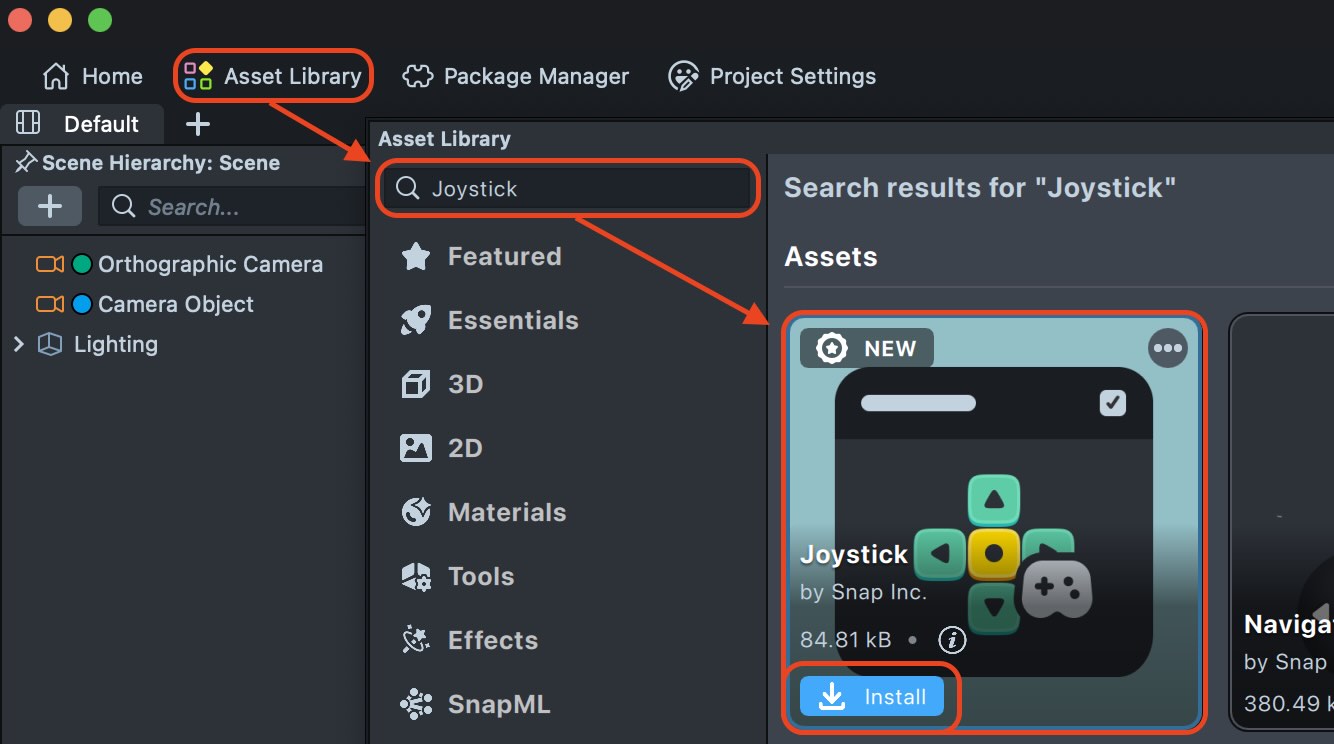
The Joystick custom component is available in the Lens
Studio Asset Library. Press Install or Update and
then add it to the Asset Browser panel by clicking the + button and looking up Joystick.
Basic Setup
- Add to Scene - Drag the Joystick component into the desired Screen Transform hierarchy.
- Configure Position - Set Fixed if you want the joystick to stay in one place, or Free if you want it to appear where the user first touches the screen.
- Set Interactive Area - If using Free positioning, optionally assign an Interactive Area to limit where the joystick can be activated.
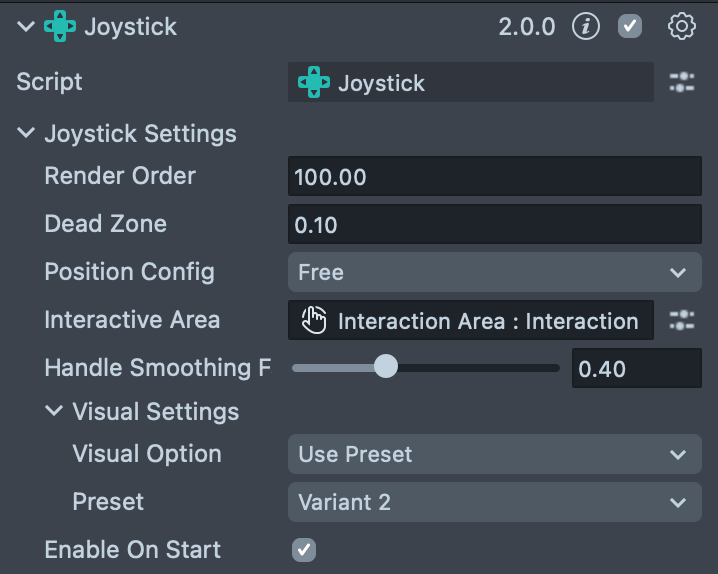
Visual Presets
The Joystick component includes three built-in visual presets
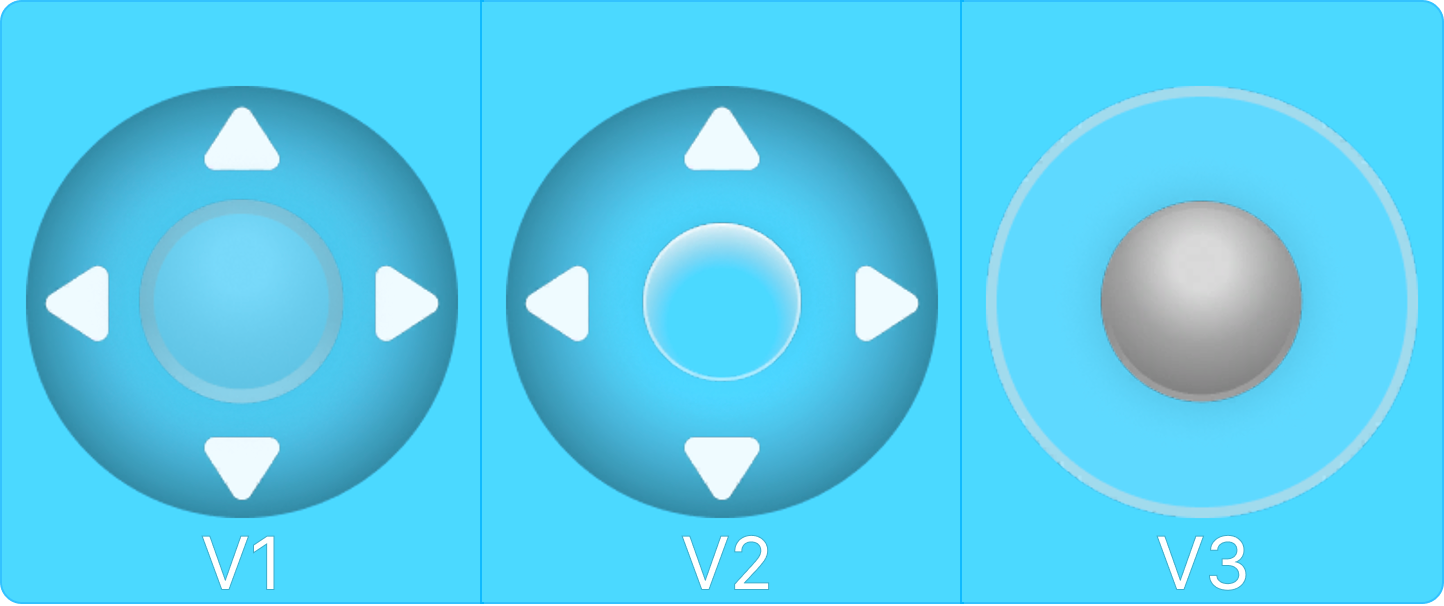
Customizing Appearance
If the built-in presets don't fit your design, select Apply Custom Materials from the Visual Option dropdown to use your own assets:
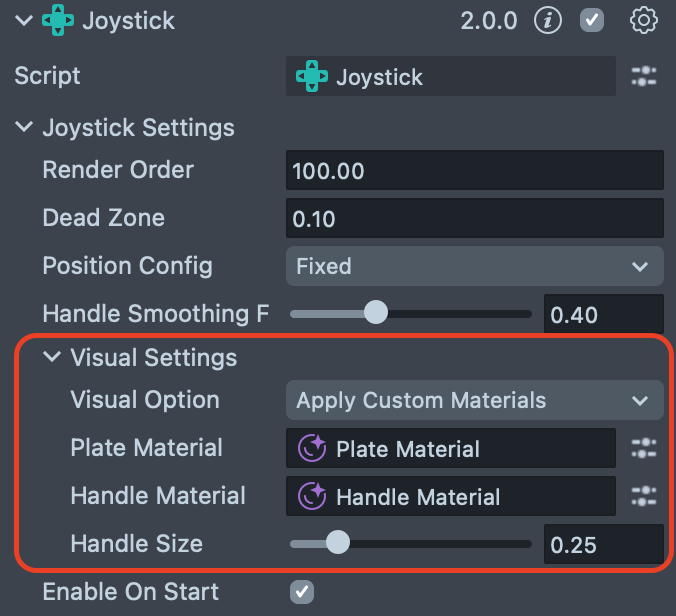
When using custom materials, you can configure:
- Plate Material: The background circular element of the joystick
- Handle Material: The movable inner element that users drag
- Handle Size: Adjusts the scale of the handle relative to the plate (0.1 to 1.0)
The joystick mesh maintains a 1:1 aspect ratio regardless of the Screen Transform dimensions.
If you need to adjust the overall size, scale the parent Screen Transform uniformly.
Component Inputs
| Property | Type | Description |
|---|---|---|
| Render Order | number | Sets the render order for all visual elements of the joystick. |
| Dead Zone | number | The radius of the central area where no input is registered. The handle must be moved beyond this distance from the center to generate input. |
| Position Config | enum | Determines how the joystick is positioned. • Free: Appears at the user's initial touch location. • Fixed: Remains in a fixed position on the screen. |
| Interactive Area | InteractionComponent | (Only shown if Position Config is Free) Constrains the Free joystick to a specific screen area. If unassigned, the joystick can be activated from anywhere. |
| Handle Smoothing Factor | number | Controls the smoothness of the handle's movement. A lower value results in smoother, more delayed movement, while a higher value is more responsive. |
| Visual Option | enum | Determines the visual style of the joystick. • Use Preset: Uses a built-in style. • Apply Custom Materials: Allows custom assets. • Transparent: Invisible. |
| Preset | enum | (Only shown if Visual Option is Use Preset) Selects one of the pre-configured visual styles (Variant 1, Variant 2, or Variant 3). |
| Plate Material | Material | (Only shown if Visual Option is Apply Custom Materials) Sets a custom material for the joystick's background plate. |
| Handle Material | Material | (Only shown if Visual Option is Apply Custom Materials) Sets a custom material for the joystick's handle. |
| Handle Size | number | (Only shown if Visual Option is Apply Custom Materials) Sets the size of the handle relative to the plate (0.1 to 1.0). |
| Enable On Start | boolean | If true, the joystick is shown when the component starts. If false, it must be shown programmatically. |
Scripting API
The Joystick component can be controlled and interacted with via its scripting API.
Static Methods
| Method | Description |
|---|---|
static create(hostingObject: SceneObject, config: JoystickConfig): Joystick | Creates a new Joystick component and adds it to the given hosting object. |
Properties
| Property | Type | Description |
|---|---|---|
direction | vec2 | Gets the current direction of the joystick. Values are in the range [-1, 1], the length is clamped to 1 and represents handle magnitude. |
Methods
| Method | Description |
|---|---|
setPlateMaterial(material: Material): void | Sets the material for the joystick's plate. |
setHandleMaterial(material: Material): void | Sets the material for the joystick's handle. |
setHandleSize(size: number): void | Sets the size of the joystick handle relative to the plate. Value should be positive. |
setRenderOrder(value: number): void | Sets the render order for all visual elements of the joystick. |
getRenderOrder(): number | Gets the render order for all visual elements of the joystick. |
show(withAnimation?: boolean): void | Shows the joystick. If withAnimation is true (default), appears with animation. |
hide(withAnimation?: boolean): void | Hides the joystick. If withAnimation is true (default), disappears with animation. |
Events
| Property | Type | Description |
|---|---|---|
directionUpdateEvent | EventSubscription<vec2> | An event that is triggered when the joystick's direction changes. The event payload is a vec2 representing the direction with magnitude. |
onViewLoadedEvent | EventSubscription<void> | An event that is triggered when the joystick view resources have finished loading and the joystick is ready for interaction. |
EventSubscription Interface:
| Method | Description |
|---|---|
add(listener: (data: T) => void): void | Adds a listener function to the event. |
addOnce(listener: (data: T) => void): void | Adds a listener that is called only once. |
remove(listener: (data: T) => void): void | Removes a specific listener. |
listenerCount(): number | Returns the number of attached listeners. |
Usage Example
This example rotates a 3D object based on joystick input.
- TypeScript
- JavaScript
import { Joystick } from 'Joystick.lsc/Joystick';

@component
export class JoystickExample extends BaseScriptComponent {
  @input
  private readonly joystick!: Joystick;
  @input
  private readonly objectToRotate!: SceneObject;

  onAwake() {
    this.joystick.directionUpdateEvent.add((direction: vec2) => {
      const direction3D = new vec3(direction.x, 0, direction.y);
      this.objectToRotate
        .getTransform()
        .setLocalRotation(quat.lookAt(direction3D, vec3.up()));
    });
  }
}
// @input Component.Joystick joystick
// @input SceneObject objectToRotate

script.joystick.directionUpdateEvent.add(function (direction) {
  const direction3D = new vec3(direction.x, 0, direction.y);
  script.objectToRotate
    .getTransform()
    .setLocalRotation(quat.lookAt(direction3D, vec3.up()));
});