Turn Based
Turn Based is a component for building asynchronous, two-player games on Snapchat. It allows players to take sequential turns, share game state via Snaps, and continue gameplay in a smooth, back-and-forth format.
Think of classics like tic-tac-toe, word games, or puzzle battles—where each move is a Snap sent to a friend.
What is a Turn Based Lens?
This feature doe not support image/texture transfer.
Here's how a Turn Based Lens works:
- Player 1 starts—Opens the Lens and takes their turn (makes a move, answers a question, etc.). When done, the Lens calls
endTurn()which automatically captures a Snap. Player 1 then sends it to a friend to challenge them, or posts to their Story to challenge all friends.
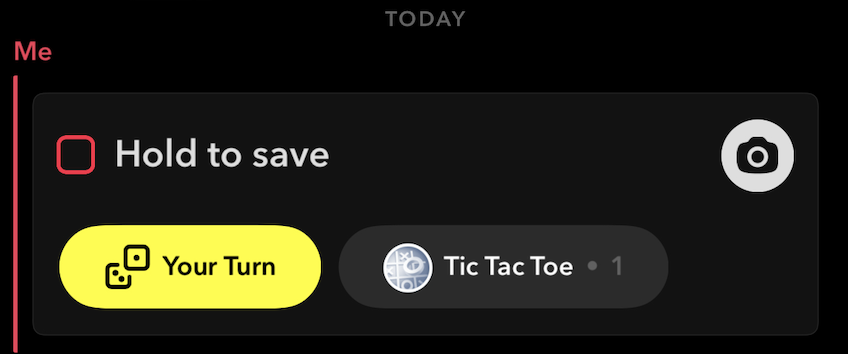
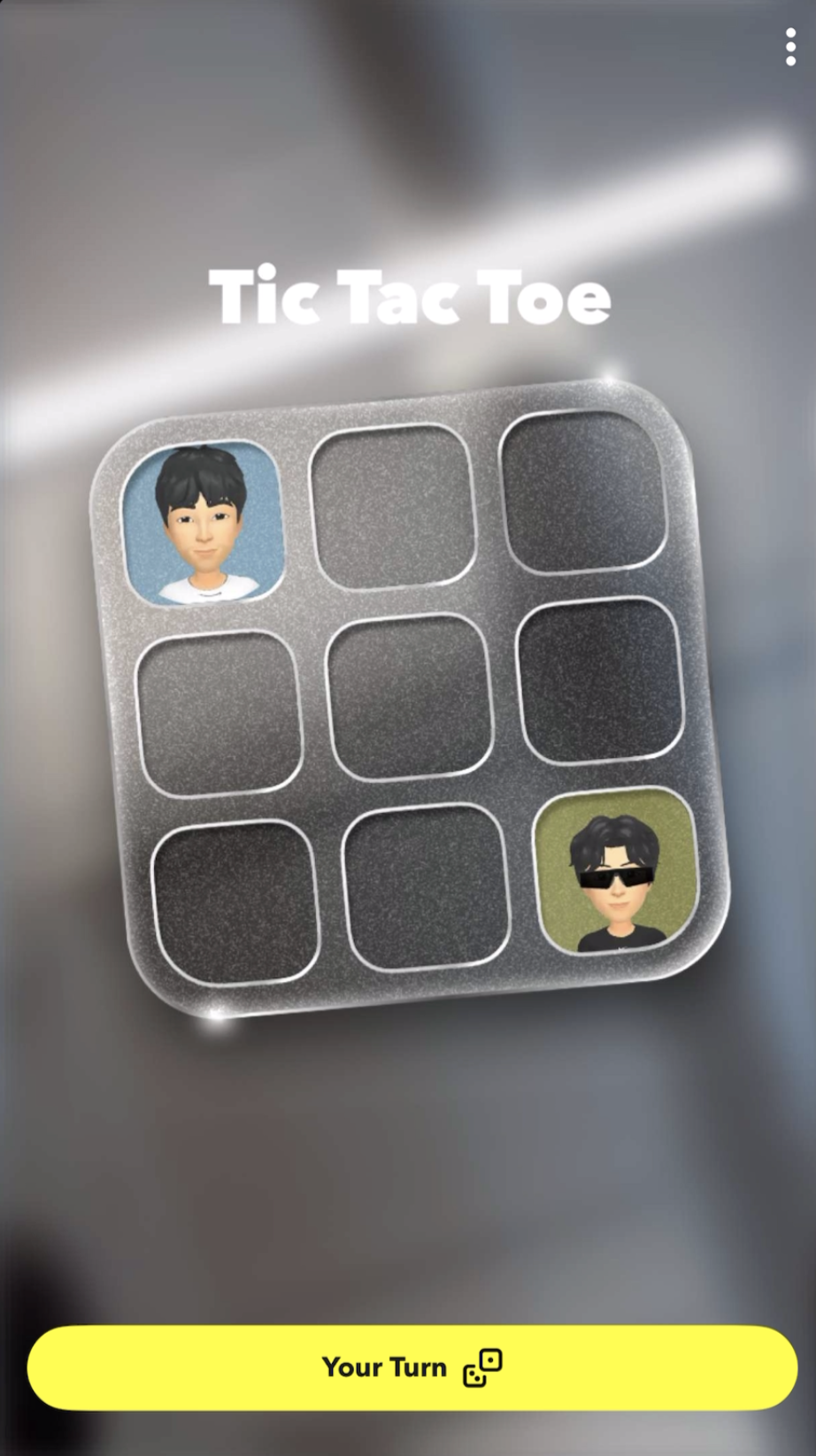
- Player 2 receives—Opens the Snap or clicks the "Your Turn" button from Chat or Story to open the Lens with the current game state.
-
Player 2 plays—Takes their turn, and sends a Snap back.
-
Repeat—Players alternate until the game ends (turn limit reached or your code calls
setIsFinalTurn(true)).
The Turn Based component handles all the complexity for you—serializing game state, detecting which player is active, managing turn history, and toggling UI elements based on whose turn it is. You just focus on your game logic.
Common use cases include:
- Word Games—players take turns adding letters, guessing words, or building sentences
- Strategy Games—chess, checkers, tic-tac-toe, or custom board games
- Quiz & Trivia—players answer questions in sequence and compare scores
- Puzzle Games—build or solve puzzles together, piece by piece
- Turn-based Storytelling—collaboratively create stories where each player adds the next chapter
- Score Challenges—race against your friend's high score, taking turns to beat each other
Turn Data
Turn Data is the core feature that makes Turn Based Lenses possible. It allows you to save game state, share it via Snaps, and load it when the next player opens the Lens. This means you can persist scores, track moves, remember choices, and maintain a continuous game experience across multiple turns and sessions.
When a Snap is sent (endTurn() is called), turn data is automatically serialized and attached. When the recipient opens the Lens, that data is restored—so the game picks up exactly where it left off.
Turn data includes several storage types:
| Storage Type | Persistence | Description |
|---|---|---|
| Global Variables | Entire session | Shared by both players. Use for game state, round number, winner. |
| User Variables | Entire session | Scoped to each player (index 0 or 1). Use for individual scores, choices. |
| Turn Variables | Current turn only | Temporary data passed to the next player. Use for the current move. |
| Turn History | Configurable | Historical record of previous turns (if enabled). |
| Tappable Areas | Current turn | Interactive regions on screen that players can tap. |
Choosing the Right Storage
Use Global and User Variables for most game data. They automatically persist across all turns, making them the simplest and most reliable choice.
Global Variables (Recommended)
Shared by both players. Perfect for game state, round numbers, or determining a winner.
- TypeScript
- JavaScript
// Set a global variable
await this.turnBased.setGlobalVariable('roundNumber', 3);

// Get a global variable
const round = await this.turnBased.getGlobalVariable('roundNumber');
// Set a global variable
await script.turnBased.setGlobalVariable('roundNumber', 3);

// Get a global variable
var round = await script.turnBased.getGlobalVariable('roundNumber');
User Variables (Recommended)
Scoped to each player. Perfect for individual scores, choices, or player-specific data.
- TypeScript
- JavaScript
// Set current player's score
await this.turnBased.setCurrentUserVariable('score', 150);

// Get the other player's score
const opponentScore = await this.turnBased.getOtherUserVariable('score');
// Set current player's score
await script.turnBased.setCurrentUserVariable('score', 150);

// Get the other player's score
var opponentScore = await script.turnBased.getOtherUserVariable('score');
Turn Variables (Legacy)
Turn Variables are still supported but are more complex to use. Unlike Global and User Variables, they do not automatically persist between turns.
Turn Variables require manual persistence. You must read incoming data with getPreviousTurnVariable() and explicitly save it with setCurrentTurnVariable() each turn, or the data will be lost. For new projects, prefer Global and User Variables instead.
Getting Started
Installing the Component
The Turn Based Custom Component is available in
the Asset Library. Press Install/Update, then add it to
the Asset Browser via the + button by searching for "Turn Based."
Setting Up a Basic Turn Loop
Follow these steps to create a basic turn-based experience:
Step 1: Add the Turn Based Component
Drag the Turn Based component from the Asset Browser onto a Scene Object in your hierarchy. This component manages all turn logic, data persistence, and player detection.
Step 2: Reference the Component in Your Script
Create a script to handle your game logic and reference the Turn Based component:
- TypeScript
- JavaScript
@component
export class MyGame extends BaseScriptComponent {
  @input('Component.ScriptComponent')
  turnBased: TurnBased;

  onAwake() {
    // Subscribe to turn events
    this.turnBased.onTurnStart.add((e) => this.onTurnStart(e));
    this.turnBased.onGameOver.add(() => this.onGameOver());
  }

  private async onTurnStart(e: TurnStartEvent) {
    print(`Turn ${e.turnCount} started for Player ${e.currentUserIndex + 1}`);

    // Load any existing scores
    const myScore = (await this.turnBased.getCurrentUserVariable('score')) || 0;
    print(`My current score: ${myScore}`);
  }

  private onGameOver() {
    print('Game Over!');
  }
}
//@input Component.ScriptComponent turnBased

script.createEvent('OnStartEvent').bind(function () {
  // Subscribe to turn events
  script.turnBased.onTurnStart.add(onTurnStart);
  script.turnBased.onGameOver.add(onGameOver);
});

async function onTurnStart(e) {
  print(
    'Turn ' + e.turnCount + ' started for Player ' + (e.currentUserIndex + 1)
  );

  // Load any existing scores
  var myScore = (await script.turnBased.getCurrentUserVariable('score')) || 0;
  print('My current score: ' + myScore);
}

function onGameOver() {
  print('Game Over!');
}
Step 3: Save Data and Complete the Turn
When the player finishes their action, save the game data and call endTurn() to capture and send the Snap:
- TypeScript
- JavaScript
private async completeTurn(playerScore: number) {
    // Save the player's score (persists across all turns)
    await this.turnBased.setCurrentUserVariable("score", playerScore);

    // Optionally set the score for display in Snapchat
    this.turnBased.setScore(playerScore);

    // Complete the turn - triggers auto capture
    this.turnBased.endTurn();
}
async function completeTurn(playerScore) {
  // Save the player's score (persists across all turns)
  await script.turnBased.setCurrentUserVariable('score', playerScore);

  // Optionally set the score for display in Snapchat
  script.turnBased.setScore(playerScore);

  // Complete the turn - triggers auto capture
  script.turnBased.endTurn();
}
That's it. When endTurn() is called, the Snap is automatically captured and the player can send it to a friend. When the friend opens the Snap, onTurnStart fires with their data loaded and ready to play.
Turn Based Game Sample Project
You can find a Turn Based Game sample project from the Lens Studio Home Page.
The Turn Based Game sample project demonstrates how to create a basic two-player competitive experience. Players take turns tapping a button as fast as they can before the timer runs out. Each player’s best score across turns is tracked, and the highest score wins.
Additional Features
Turn Based Player Info
The Turn Based Player Info component lets you display player identities in your game—including 3D Bitmoji avatars, Bitmoji sticker textures, and display names. Each component targets a specific player (current user, other user, or by player index), so you can show "Player 1" in one spot and "Player 2" in another without writing any code. This is perfect for scoreboards, turn indicators, or game over screens that show who won.
Auto Capture
Auto Capture automatically triggers Snap capture when endTurn() is called, eliminating the need for users to manually take a photo/video.
How It Works
Auto Capture is enabled by default and is the recommended approach for Turn Based Lenses. Here's how it works:
- Calling
endTurn()marks the turn complete AND triggers the capture - The player is taken directly to the post capture screen
- Manual capture buttons are disabled for the player
To disable Auto Capture (not recommended), select the Turn Based component in the Asset Browser, unhide the "Auto Capture Helper" input in the Inspector panel, and clear the helper reference from that input.
With Auto Capture enabled, users cannot manually capture. Ensure your game has a clear trigger point (timer, action completion, etc.) for ending the turn.
Manual End Turn Button
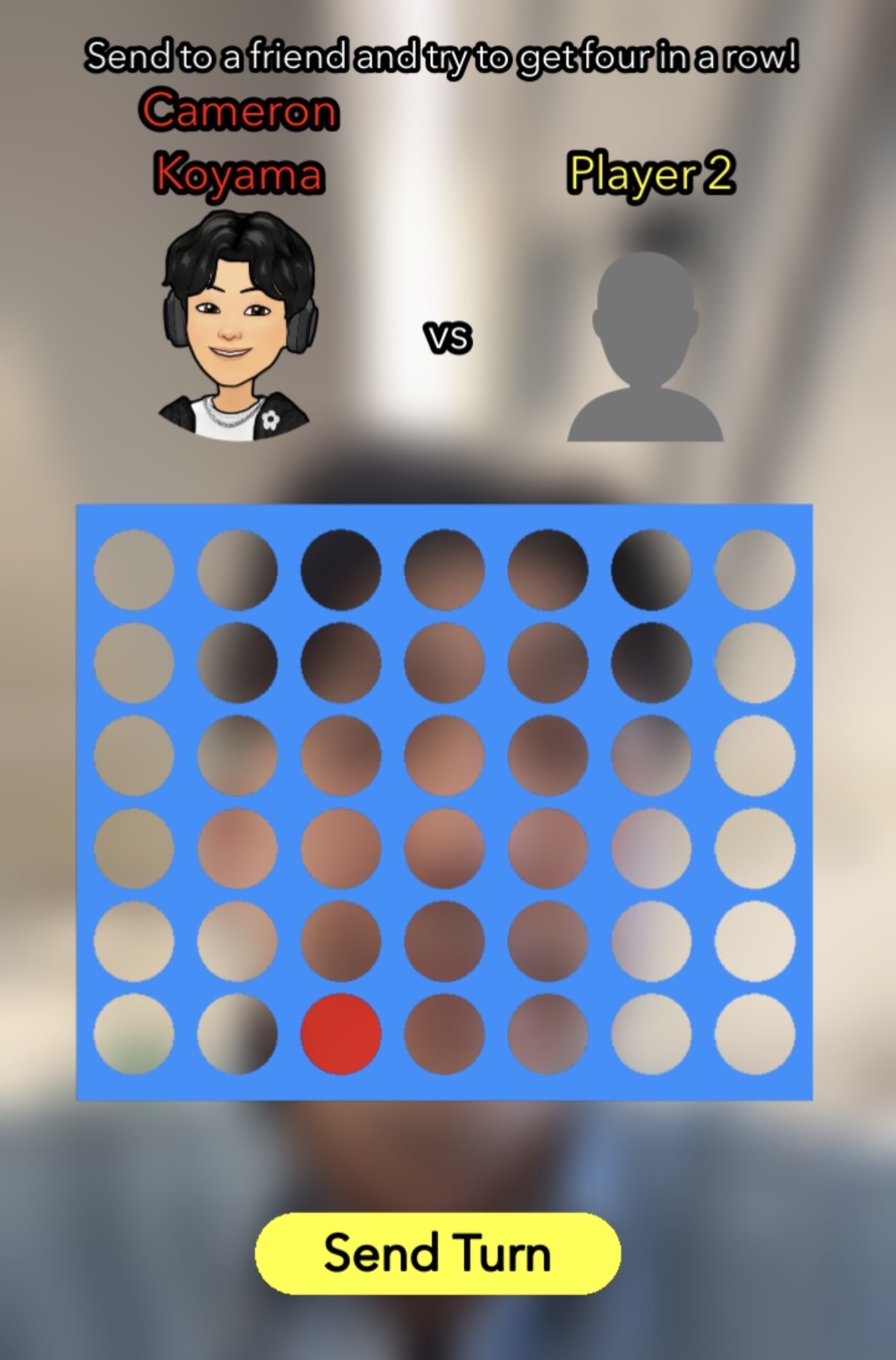
Some games benefit from giving players explicit control over when their turn completes. Instead of automatically calling endTurn() in your code, you can provide an in-Lens button that players tap when ready, allowing them to review and confirm their move before the Snap is captured.
Use this approach for:
- Games where players need to confirm their move (Connect Four, chess, etc.)
- Games where players may want to edit their turn before completing it
- Any Lens using Turn Restore (required to avoid infinite loops)
- Lenses that want to mimic manual capture behavior
Example implementation:
@component
export class MyGame extends BaseScriptComponent {
  @input('Component.ScriptComponent')
  turnBased: TurnBased;

  @input
  endTurnButton: SceneObject;

  onAwake() {
    this.endTurnButton.enabled = false;
    this.turnBased.onTurnStart.add((e) => this.onTurnStart(e));

    const tapComponent = this.endTurnButton.getComponent(InteractionComponent);
    tapComponent.onTap.add(() => this.onEndTurnTapped());
  }

  private async onTurnStart(e: TurnStartEvent) {
    // Load game state
    const myScore = (await this.turnBased.getCurrentUserVariable('score')) || 0;
    this.endTurnButton.enabled = true;
  }

  // When player makes a move, DO NOT call endTurn() automatically
  private async onPlayerMove(moveData: any) {
    await this.turnBased.setCurrentUserVariable('lastMove', moveData);
    // Wait for user to tap the end turn button
  }

  // Only call endTurn() when user explicitly taps the button
  private async onEndTurnTapped() {
    this.turnBased.setScore(100);
    this.endTurnButton.enabled = false;
    this.turnBased.endTurn(); // Triggers auto capture
  }
}
This pattern is essential when using Turn Restore to avoid infinite capture loops.
Turn Restore (Auto Restore Turn)
Turn Restore is an optional feature that caches turn data, allowing players to resume their turn if they close the Lens without sending the Snap. Most developers won't need this feature—it's primarily useful for games with long or complex turns where losing progress would frustrate players.
How It Works
- Enable "Auto Restore Turn" in the component inspector (or call
setCacheTurnDataForRestore(true)) - As the user plays, all turn data modifications are cached automatically
- If the user closes the Lens without sending:
- Turn data, variables, and score are preserved
- When they reopen the Lens, cached data is restored
wasTurnDataRestored()returnstrue
- The user can continue from where they left off
API Methods
| Method | Description |
|---|---|
getCacheTurnDataForRestore(): boolean | Returns whether turn data caching is enabled |
setCacheTurnDataForRestore(value): void | Enables/disables turn data caching |
wasTurnDataRestored(): Promise<boolean> | Returns true if current turn was restored from cache |
showRetryDisclaimer(): Promise<void> | Shows a disclaimer prompting user to send their turn |
Implementation Best Practices
When using Turn Restore with Auto Capture, you must implement proper user interaction before calling endTurn(). Without this, your Lens can create an infinite loop that traps users.
The Problem:
If you automatically call endTurn() immediately when a turn is restored, the following infinite loop occurs:
- Check for restored turn → Auto Capture → Preview → Exit Preview →
- Check for restored turn → Auto Capture → Preview → Exit Preview →
- (repeats indefinitely)
Users cannot escape this loop without force-closing the app.
Recommended Implementation:
When using Turn Restore, always require explicit user action before calling endTurn(). Implement a manual "End Turn" or "Submit" button in your Lens that users must tap to complete their turn.
- TypeScript
- JavaScript
private async onTurnStart(e: TurnStartEvent) {
  // Check if this turn was restored from cache
  const wasRestored = await this.turnBased.wasTurnDataRestored();

  if (wasRestored) {
    print('Turn restored - user can continue from where they left off');
    // Optionally show a message: "Your turn was restored - continue playing!"
  }

  // Load game state
  const myScore = await this.turnBased.getCurrentUserVariable('score') || 0;

  // DO NOT call endTurn() here, even if the turn was restored
  // Wait for user to explicitly tap the "End Turn" button
}

// Only call endTurn() when user explicitly taps a button
private onEndTurnButtonTapped() {
  // User has finished their turn and tapped the button
  this.turnBased.endTurn();
}
async function onTurnStart(e) {
  // Check if this turn was restored from cache
  var wasRestored = await script.turnBased.wasTurnDataRestored();

  if (wasRestored) {
    print('Turn restored - user can continue from where they left off');
    // Optionally show a message: "Your turn was restored - continue playing!"
  }

  // Load game state
  var myScore = (await script.turnBased.getCurrentUserVariable('score')) || 0;

  // DO NOT call endTurn() here, even if the turn was restored
  // Wait for user to explicitly tap the "End Turn" button
}

// Only call endTurn() when user explicitly taps a button
function onEndTurnButtonTapped() {
  // User has finished their turn and tapped the button
  script.turnBased.endTurn();
}
Component Inputs
Turn Limit
| Input | Type | Description |
|---|---|---|
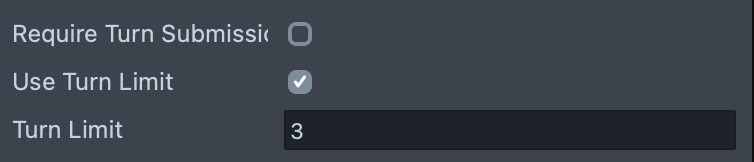
| Use Turn Limit | boolean | Enables a maximum number of turns in the game. |
| Turn Limit | int | The maximum number of turns. Game ends when turnCount + 1 >= turnLimit. Visible if Use Turn Limit is enabled. |
Turn History
| Input | Type | Description |
|---|---|---|
| Save Turn History | boolean | Enables storing data from previous turns. |
| Turns Saved Limit | int | Max number of past turns to keep; older turns are discarded. Visible if Save Turn History is enabled. |
Advanced Options
| Input | Type | Description |
|---|---|---|
| Auto Restore Turn | boolean | If true, restores current turn variables if endTurn() is called and the Lens is reopened before sending the Snap. |
Tappable Areas
| Input | Type | Description |
|---|---|---|
| Tappable Areas | TappableArea[] | Only tappable areas with enabled ScreenTransforms and SceneObjects are used. |
TappableArea item fields:
- Key (string): Unique identifier returned by
getTappedKey()when tapped to open the Lens. - Screen Transform (ScreenTransform): Defines the on-screen region.
Scene Management
| Input | Type | Description |
|---|---|---|
| User 1 Scene Objects | SceneObject[] | Enabled when it is User 1's turn (currentUserIndex = 0). Disabled otherwise. |
| User 2 Scene Objects | SceneObject[] | Enabled when it is User 2's turn (currentUserIndex = 1). Disabled otherwise. |
| Game Over Scene Objects | SceneObject[] | Enabled when the game ends (turn limit reached or setIsFinalTurn(true)). Visible if Require Turn Submission is enabled. |
Events (Responses)
| Input | Type | Description |
|---|---|---|
| On Turn Start Responses | DiscreteResponseConfig[] | Responses triggered when onTurnStart fires. |
| On Turn End Responses | DiscreteResponseConfig[] | Responses triggered when onTurnEnd fires. |
| On Game Over Responses | DiscreteResponseConfig[] | Responses triggered when onGameOver fires. |
Tappable Areas limitations Excess tappable areas or values outside these limits are skipped:
- Max tappable areas sent: 16
- Max total screen coverage by tappable areas: 0.4
- Max key length: 24 characters
- Center position limits (screen coords): 0.05 < x < 0.95, 0.05 < y < 0.95
- Min aspect ratio (min side / max side): 0.125
Debug Settings
| Input | Type | Description |
|---|---|---|
| Debug Mode | enum (None, Single Turn, Simulate Turns) | Select a testing mode for Lens Studio. |
| Print Logs | boolean | Enables detailed logging to the console. |
| Logger Settings | LoggerConfig | Configure on-screen/console logger (font size, levels). Visible if Print Logs is enabled. |
| Show Debug View | boolean | Displays a real-time overlay with current game state. |
Simulate Turns options (Debug Mode = Simulate Turns):
| Input | Type | Description |
|---|---|---|
| Swap Players After Simulated Turn | boolean | After each simulated turn, swaps user0 and user1 so you can test both player perspectives. When enabled, the component's current user index alternates and may not match the actual Snapchat user. Useful for multi-turn debugging. |
| Tapped Key | string | The key to simulate as tapped when opening the Lens. |
Single Turn options (Debug Mode = Single Turn):
| Input | Type | Description |
|---|---|---|
| Turn Count | int | Even numbers for User 1 (starting at 0), odd for User 2 (starting at 1). |
| Tapped Key | string | The key to simulate as tapped when opening the Lens. |
| Test Data Type | enum (Studio Inputs, JSON String) | Choose how to provide mock previous-turn data. |
| Test Is Turn Complete | boolean | Whether the previous turn is marked complete. |
| Test Is Turn Restored From Cache | boolean | Simulate a restored turn to test turn restore behavior. |
| Test Data | UserDefinedGameVariableInput[] | Key/value list for mock previous-turn variables. Visible if Test Data Type is Studio Inputs. |
| Test Turn History | DebugTurnHistoryStudioInputs[] | Array of turn history entries (studio inputs). Visible if Test Data Type is Studio Inputs. |
| Test Data | string (JSON) | JSON string for mock previous-turn variables. Visible if Test Data Type is JSON String. |
| Test Turn History | DebugTurnHistoryJsonStrings[] | Array of turn history entries (JSON strings). Visible if Test Data Type is JSON String. |
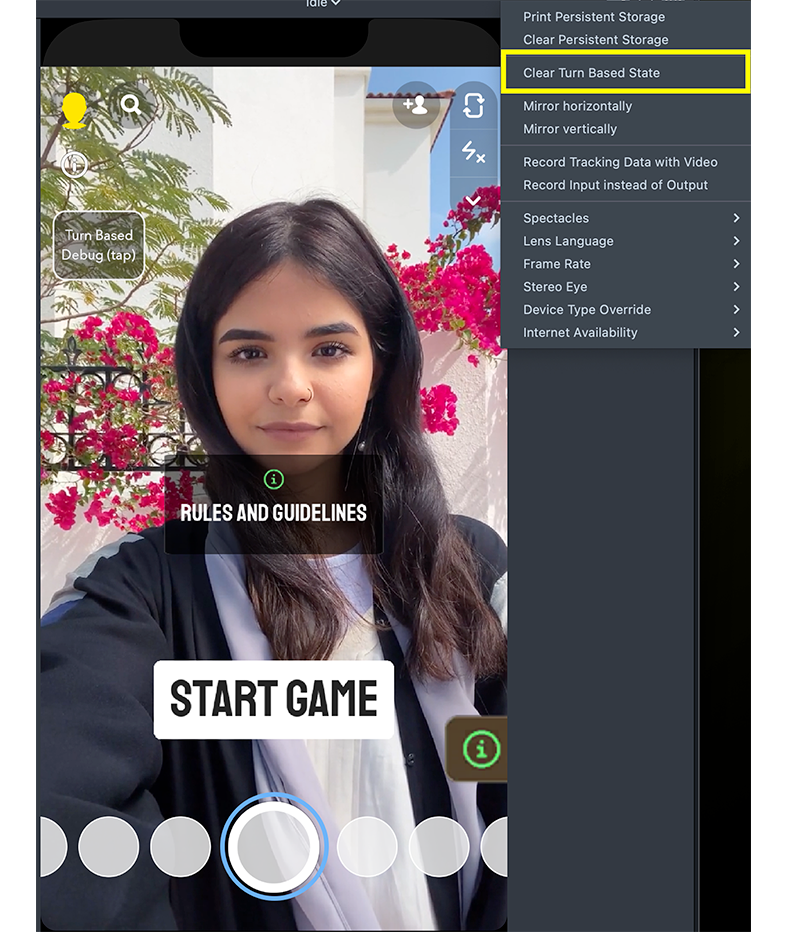
To reset simulated turns, open Additional Options in the preview and select "Clear Turn Based State."
Component API
Methods
| Method | Return Type | Description |
|---|---|---|
getCurrentUserIndex() | Promise<number> | Returns index of current user, starting from 0. |
getOtherUserIndex() | Promise<number> | Returns the index of the other user (0 or 1). |
getTappedKey() | string | Key of tappable area tapped before the Lens opened. Empty string if none. |
addTappableArea(key: string, screenTransform: ScreenTransform) | void | Add a tappable area described by Screen Transform with a key. |
removeTappableArea(key: string) | void | Remove a tappable area by key. |
clearTappableAreas() | void | Clear all tappable areas. |
getTurnCount() | Promise<number> | Current turn count, starting from 0. |
getPreviousTurnVariable(key: string) | Promise<UserDefinedGameVariable | undefined> | Get a previous turn variable by key. UserDefinedGameVariable is number, string, boolean, or a dictionary/array of these. |
getPreviousTurnVariables() | Promise<UserDefinedGameVariablesMap> | Get previous turn variables (data received with the Snap) as a dictionary. Empty {} on the first turn. |
getCurrentTurnVariable(key: string) | UserDefinedGameVariable | undefined | Get the current turn variable (data to be sent). If value is an object/array, call setCurrentTurnVariable after updating it to ensure changes are handled. |
setCurrentTurnVariable(key: string, value: UserDefinedGameVariable) | void | Set a current turn variable. |
setScore(score: number | null) | void | Sets score for the current turn. Pass null to clear the score. The score will be included in the turn data. |
getScore() | number | null | Returns currently set score or null if no score is set. |
endTurn() | void | Completes the turn, automatically captures a Snap for the user to send, and caches the current turn data to be restored if "Auto Restore Turn" is enabled. |
setIsFinalTurn(isFinalTurn: boolean) | void | Marks the current turn as the last in the session when true. |
isFinalTurn() | Promise<boolean> | Returns true if the current turn is the final turn (limit reached or manually set). |
getCacheTurnDataForRestore() | boolean | Returns whether making changes to the turn data will cache it for restore if user closes the Lens without sending snap. |
setCacheTurnDataForRestore(value: boolean) | void | Sets whether making changes to the turn data will cache it for restore if user closes the Lens without sending snap. Data that is already cached will not be affected. |
showRetryDisclaimer() | Promise<void> | If the user has played their turn but did not send the snap back, use this method to show a disclaimer prompting the user to send the snap to continue the game. The promise is rejected if there was an error. |
getCurrentUserDisplayName() | Promise<string> | Get the current user's display name. |
getOtherUserDisplayName() | Promise<string> | Get the other user's display name. |
getTurnHistory() | Promise<TurnHistoryEntry[]> | Get an array of recent turn history entries ordered by turn count. Empty on the first turn. The last entry always matches previous turn variables. TurnHistoryEntry: turnCount: number; userDefinedGameVariables: UserDefinedGameVariablesMap; isTurnComplete: boolean. |
getTurn(turnCount: number) | Promise<TurnHistoryEntry | null> | Get turn history entry for a specific turn, or null if it doesn't exist. |
getPreviousTurn() | Promise<TurnHistoryEntry | null> | Get the previous turn's history entry (same data as previous turn variables) or null. |
getUser(index: number) | Promise<SnapchatUser | null> | Returns the Snapchat user for the provided index; returns null for the current user. Can be used to load Bitmoji. Promise rejects on load error. |
getCurrentUser() | Promise<SnapchatUser> | Get the current Snapchat user. |
getOtherUser() | Promise<SnapchatUser> | Get the other Snapchat user. |
getUserVariable(userIndex: number, key: string) | Promise<UserDefinedGameVariable | undefined> | Get a per-session variable for a specific user. |
setUserVariable(userIndex: number, key: string, value: UserDefinedGameVariable) | Promise<void> | Set a per-session variable for a specific user. |
getUserVariables(userIndex: number) | Promise<UserDefinedGameVariablesMap> | Get all per-session variables for a specific user as a dictionary. |
getCurrentUserVariable(key: string) | Promise<UserDefinedGameVariable | undefined> | Get a per-session variable for the current user. |
setCurrentUserVariable(key: string, value: UserDefinedGameVariable) | Promise<void> | Set a per-session variable for the current user. |
getOtherUserVariable(key: string) | Promise<UserDefinedGameVariable | undefined> | Get a per-session variable for the other user. |
setOtherUserVariable(key: string, value: UserDefinedGameVariable) | Promise<void> | Set a per-session variable for the other user. |
getGlobalVariable(key: string) | Promise<UserDefinedGameVariable | undefined> | Get a per-session variable for the entire game session. |
setGlobalVariable(key: string, value: UserDefinedGameVariable) | Promise<void> | Set a per-session variable for the entire game session. |
getGlobalVariables() | Promise<UserDefinedGameVariablesMap> | Get all global variables as a dictionary. |
wasTurnDataRestored() | Promise<boolean> | Returns true if the current turn was restored from cache (user closed Lens without sending). |
Object/array variables
If a turn variable is an object or array, call setCurrentTurnVariable after mutating it to ensure changes are saved.
For example:
turnBased.getCurrentTurnVariable('throw_data').force = 100; // may not be saved
// correct usage:
const throwData = turnBased.getCurrentTurnVariable('throw_data');
throwData.force = 100;
turnBased.setCurrentTurnVariable('throw_data', throwData);
User loading
getUser(index: number) returns null for the current user and rejects the promise if a load error occurs.
Deprecated Methods
The following methods are kept for backward compatibility. Prefer the alternatives noted.
| Method | Replacement/Notes |
|---|---|
getPromptVariable(key) | Use getPreviousTurnVariable(key) instead. |
getPromptVariables() | Use getPreviousTurnVariables() instead. |
getTurnVariable(key) | Use getCurrentTurnVariable(key) instead. |
setTurnVariable(key, value) | Use setCurrentTurnVariable(key, value) instead. |
removeTurnVariable(key) | Use setCurrentTurnVariable(key, undefined) instead. |
clearTurnVariables() | Use setCurrentTurnVariable for each key or reset default Turn Variables as needed. |
Properties
You can also get and set properties directly on the component.
| Property | Description |
|---|---|
user1SceneObjects | An array of SceneObjects to be enabled only for User 1. |
user2SceneObjects | An array of SceneObjects to be enabled only for User 2. |
gameOverSceneObjects | An array of SceneObjects to be enabled when the game is over. |
turnLimit | The maximum number of turns in the game. |
tappableAreas | The array of tappable areas. |
Events
| Event | When it fires | Payload |
|---|---|---|
onTurnStart | After prompt data loads and the turn starts (each Lens open or simulated turn). | { currentUserIndex, tappedKey, turnCount, promptDataVariables } |
onTurnEnd | After endTurn() is called and it's not the final turn. Requires Require Turn Submission. | none |
onGameOver | After endTurn() is called on the final turn (turn limit reached or setIsFinalTurn(true)). Requires Require Turn Submission. | none |
onError | When incomplete turn data is sent or received is detected by the component. | { code, description } |
Variable Types
UserDefinedGameVariable
Variables can be one of the following types: strings, numbers, booleans, objects, or arrays of these types.
- TypeScript
- JavaScript
// Type definition
type UserDefinedGameVariable =
  | string
  | number
  | boolean
  | { [key: string]: UserDefinedGameVariable }
  | string[]
  | number[]
  | boolean[]
  | { [key: string]: UserDefinedGameVariable }[];

// Examples
await this.turnBased.setGlobalVariable('roundNumber', 3); // number
await this.turnBased.setGlobalVariable('gameMode', 'classic'); // string
await this.turnBased.setGlobalVariable('isGameOver', false); // boolean
await this.turnBased.setGlobalVariable('scores', [100, 250, 50]); // number array
await this.turnBased.setGlobalVariable('playerData', {
  // object
  name: 'Player1',
  level: 5,
  achievements: ['first_win', 'high_score'],
});
// Examples
await script.turnBased.setGlobalVariable('roundNumber', 3); // number
await script.turnBased.setGlobalVariable('gameMode', 'classic'); // string
await script.turnBased.setGlobalVariable('isGameOver', false); // boolean
await script.turnBased.setGlobalVariable('scores', [100, 250, 50]); // number array
await script.turnBased.setGlobalVariable('playerData', {
  // object
  name: 'Player1',
  level: 5,
  achievements: ['first_win', 'high_score'],
});
Variable Storage Types
| Storage Type | Persistence | Use Case |
|---|---|---|
| Global Variables | Entire session | Game state, winners |
| User Variables | Entire session | Per-player scores, stats |
| Turn Variables (not recommended) | Current turn only | Legacy, requires manual persistence |
TurnHistoryEntry
interface TurnHistoryEntry {
  readonly turnCount: number;
  readonly userDefinedGameVariables: UserDefinedGameVariablesMap;
  readonly isTurnComplete: boolean;
}
UserDefinedGameVariablesMap
interface UserDefinedGameVariablesMap {
  [key: string]: UserDefinedGameVariable;
}
Turn Loop Example
This example shows the core turn-based game loop: reading game state, handling player actions, saving scores, and ending the turn.
- TypeScript
- JavaScript
// Storage keys for persistent data
const KEY_USER_BEST = 'best';
const KEY_GLOBAL_WINNER = 'winnerIdx';

@component
export class GameLogic extends BaseScriptComponent {
  @input('Component.ScriptComponent') turnBased: TurnBased;

  private currentPlayerIndex: number = 0;

  onAwake() {
    this.turnBased.onTurnStart.add((e) => this.onTurnStart(e));
    this.turnBased.onGameOver.add(() => this.onGameOver());
  }

  // Called when a turn begins
  private async onTurnStart(e: TurnStartEvent) {
    this.currentPlayerIndex = e.currentUserIndex;
    print(
      `Turn ${e.turnCount + 1} started for Player ${e.currentUserIndex + 1}`
    );

    // Load both players' best scores
    const myBest =
      (await this.turnBased.getCurrentUserVariable(KEY_USER_BEST)) || 0;
    const opponentBest =
      (await this.turnBased.getOtherUserVariable(KEY_USER_BEST)) || 0;
    print(`My best: ${myBest}, Opponent best: ${opponentBest}`);
  }

  // Called when player finishes their action
  private async onPlayerFinished(score: number) {
    print(`Player finished with score: ${score}`);

    // Save score if it's a new personal best
    const currentBest =
      (await this.turnBased.getCurrentUserVariable(KEY_USER_BEST)) || 0;
    if (score > Number(currentBest)) {
      await this.turnBased.setCurrentUserVariable(KEY_USER_BEST, score);
      print(`New personal best: ${score}`);
    }

    // Check if this is the final turn
    const isFinal = await this.turnBased.isFinalTurn();
    if (isFinal) {
      // Determine and save winner
      const myBest =
        (await this.turnBased.getCurrentUserVariable(KEY_USER_BEST)) || 0;
      const opponentBest =
        (await this.turnBased.getOtherUserVariable(KEY_USER_BEST)) || 0;
      const winnerIdx =
        Number(myBest) > Number(opponentBest)
          ? this.currentPlayerIndex
          : Number(opponentBest) > Number(myBest)
            ? 1 - this.currentPlayerIndex
            : -1;
      await this.turnBased.setGlobalVariable(KEY_GLOBAL_WINNER, winnerIdx);
      print(`Game over! Winner: Player ${winnerIdx + 1}`);
    }

    // Set score and end turn (triggers Snap capture)
    this.turnBased.setScore(score);
    this.turnBased.endTurn();
    print('Turn ended, Snap captured');
  }

  // Called when game ends
  private async onGameOver() {
    const winnerIdx = await this.turnBased.getGlobalVariable(KEY_GLOBAL_WINNER);
    print(`Game Over! Winner: Player ${Number(winnerIdx) + 1}`);
  }
}
// Storage keys for persistent data
var KEY_USER_BEST = 'best';
var KEY_GLOBAL_WINNER = 'winnerIdx';

//@input Component.ScriptComponent turnBased

var currentPlayerIndex = 0;

script.createEvent('OnStartEvent').bind(function () {
  script.turnBased.onTurnStart.add(onTurnStart);
  script.turnBased.onGameOver.add(onGameOver);
});

// Called when a turn begins
async function onTurnStart(e) {
  currentPlayerIndex = e.currentUserIndex;
  print(
    'Turn ' +
      (e.turnCount + 1) +
      ' started for Player ' +
      (e.currentUserIndex + 1)
  );

  // Load both players' best scores
  var myBest =
    (await script.turnBased.getCurrentUserVariable(KEY_USER_BEST)) || 0;
  var opponentBest =
    (await script.turnBased.getOtherUserVariable(KEY_USER_BEST)) || 0;
  print('My best: ' + myBest + ', Opponent best: ' + opponentBest);
}

// Called when player finishes their action
async function onPlayerFinished(score) {
  print('Player finished with score: ' + score);

  // Save score if it's a new personal best
  var currentBest =
    (await script.turnBased.getCurrentUserVariable(KEY_USER_BEST)) || 0;
  if (score > Number(currentBest)) {
    await script.turnBased.setCurrentUserVariable(KEY_USER_BEST, score);
    print('New personal best: ' + score);
  }

  // Check if this is the final turn
  var isFinal = await script.turnBased.isFinalTurn();
  if (isFinal) {
    // Determine and save winner
    var myBest =
      (await script.turnBased.getCurrentUserVariable(KEY_USER_BEST)) || 0;
    var opponentBest =
      (await script.turnBased.getOtherUserVariable(KEY_USER_BEST)) || 0;
    var winnerIdx =
      Number(myBest) > Number(opponentBest)
        ? currentPlayerIndex
        : Number(opponentBest) > Number(myBest)
          ? 1 - currentPlayerIndex
          : -1;
    await script.turnBased.setGlobalVariable(KEY_GLOBAL_WINNER, winnerIdx);
    if (winnerIdx === -1) {
      print("Game over! It's a tie!");
    } else {
      print('Game over! Winner: Player ' + (winnerIdx + 1));
    }
  }

  // Set score and end turn (triggers Snap capture)
  script.turnBased.setScore(score);
  script.turnBased.endTurn();
  print('Turn ended, Snap captured');
}

// Called when game ends
async function onGameOver() {
  var winnerIdx = await script.turnBased.getGlobalVariable(KEY_GLOBAL_WINNER);
  print('Game Over! Winner: Player ' + (Number(winnerIdx) + 1));
}
Key patterns demonstrated:
- Reading state on turn start—Load Global and User Variables to restore game state
- Saving User Variables—Each player's best score is stored with
setUserVariable() - Saving Global Variables—Game stage and winner are shared between both players
- Ending the turn—Call
setScore()thenendTurn()to capture and send the Snap - Handling game over—Read final state and display results
Debugging and Testing
Debug Modes
Debug settings only work in Lens Studio editor and have no effect in published Lenses.
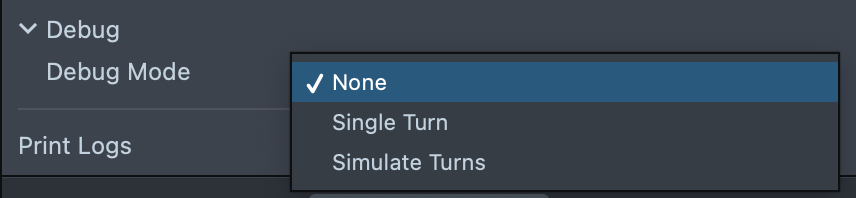
The component provides three debug modes for testing:
- None—Normal operation (use in production)
- Single Turn—Test specific turn scenarios in editor
- Simulate Turns—Full turn sequence simulation in editor
Simulate Turns in Lens Studio
When debugMode is set to Simulate Turns, the Turn Based Component simulates a full game loop in Lens Studio using persistent editor memory. This allows you to test turn-by-turn logic without publishing or sending real Snaps.
Each time endTurn() is called:
1. Current Turn is Serialized The current session data is saved internally as if a Snap was sent:
- All data set with
setGlobalVariable()orsetUserVariable() - The score set with
setScore()
This mimics sending a Snap to the other player.
2. Turn Advances
After endTurn() is called, Lens Studio simulates a captured Snap preview. Close the Snap preview (tap the X in the upper left corner) to advance to the next turn.
3. Role Swaps The player role alternates automatically:
- Even turns: Player 1
- Odd turns: Player 2
Scene elements like user1SceneObjects and user2SceneObjects will toggle accordingly.
4. Variable Propagation
Data flows forward between turns as follows:
- Global Variables and User Variables are persisted automatically across all turns
- Use
getGlobalVariable()andgetUserVariable(index)to confirm expected state
5. Reset Simulated State To reset the turn count and all cached data, open "Additional Options" (gear icon) in the upper right corner of the Preview Window and select "Clear Turn Based State".
Debugging Tips
Testing Multiple Turns
- Set Debug Mode to "Simulate Turns"
- Enable Swap Players After Simulated Turn
- Run preview and complete turns to test the full flow
Clearing State
Open Additional Options in the preview and select "Clear Turn Based State" to reset all cached and simulated data.
Debug View
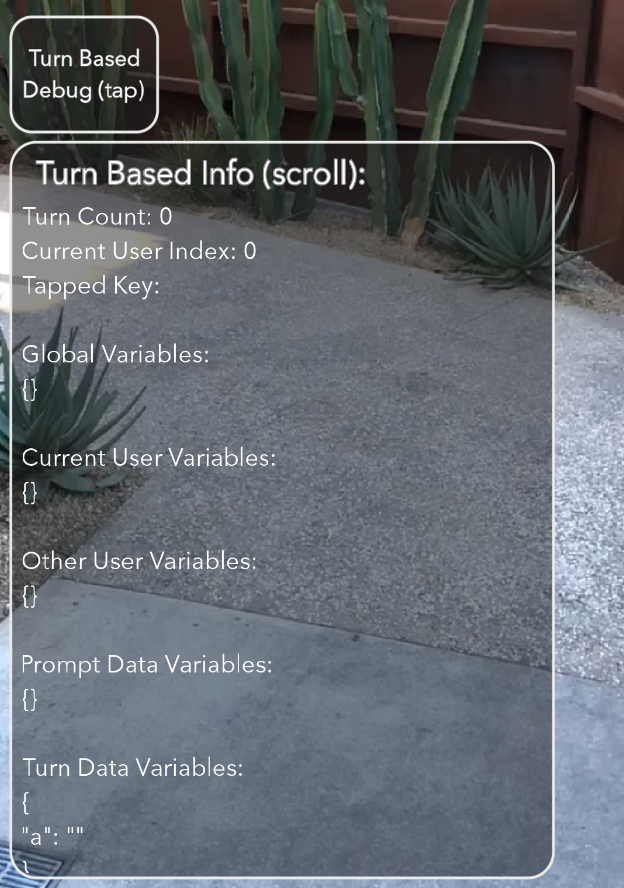
Enable Show Debug View to see real-time overlay showing: - Current turn count - Current user index - Tapped key - All variable storage
Best Practices
- Provide clear visual feedback for whose turn it is
- When the turn is complete, call
endTurn()at a clear action point to trigger Snap capture - Use Global Variables first to manage persistent game data
- Include previous turn replay for complex games
Error handling:
- Always listen for
onErrorevents and provide user feedback - Validate game state before calling
endTurn()
Previewing Your Lens
To preview your Turn Based Lens in Snapchat, follow the Pairing to Snapchat guide. Suggested testing flow:
- Push the Lens to your device to test User 1
- Take a Snap after making your first move
- Send the Snap to yourself to simulate sending to User 2
- Open the Snap to test User 2 and make the next move
- Take another Snap and send it back to yourself to continue
- Repeat steps 4–5 to exercise the full flow
During development, send Snaps to yourself; others won't be able to interact with your Lens while using push-to-device.
Publishing Your Lens
To use a published Turn Based Lens with other users, you must set the visibility of the Lens to Public.
Turn Based functionality requires your Lens to be published as Public. Hidden or Offline Lenses cannot properly share turn data between users, which will cause the turn-based gameplay to fail.