Toggle Group
A Toggle Group is a non visual component that orchestrates selection across multiple toggleables. It can manage events, and enforce selection options across the entire group. This component makes sure maximum one toggle of the group is always selected. This is useful for making selection based interactions
Switch Group
A Switch Group is essentially identical to a Toggle Group, except you attach Switches as opposed to Toggles.
Component Breakdown
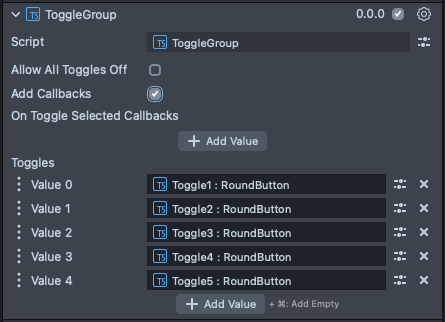
Allow All Toggles Off | Allows the group to have no toggles selected. The default is false. |
Add Callbacks | Adds the editor hooks for the event callbacks to the element. |
On Toggle Selected Callback | Fires a callback event any time one of the attached toggles is selected. |
Toggles | The in panel interface for attaching Toggles to this group. Toggles added here are managed by this Toggle Group element. |
Code Example
- TypeScript
- JavaScript
import { ToggleGroup } from 'SpectaclesUIKit.lspkg/Scripts/Components/Toggle/ToggleGroup';
import { RoundButton } from 'SpectaclesUIKit.lspkg/Scripts/Components/Button/RoundButton';

/**
 * A simple programmatic toggle group example
 */

@component
export class ExampleToggleGroupScript extends BaseScriptComponent {
  onAwake() {
    const toggleGroup = this.sceneObject.createComponent(
      ToggleGroup.getTypeName()
    );

    for (let i = 0; i < 8; i++) {
      const toggle = this.createToggleButton(i);
      toggleGroup.registerToggleable(toggle);
    }

    toggleGroup.onToggleSelected.add((args) => {
      print(`Toggle selected: ${args.toggleable.sceneObject.name}`);
    });
  }

  createToggleButton(index: number) {
    const object = global.scene.createSceneObject('Toggle ' + index);
    object.setParent(this.sceneObject);
    const toggle = object.createComponent(RoundButton.getTypeName());
    toggle.setIsToggleable(true);
    toggle.width = 2;
    toggle.initialize();
    toggle.transform.setLocalPosition(new vec3(0, (index + 1) * 2, 0));
    return toggle;
  }
}
// Import required modules
const ToggleGroup =
  require('SpectaclesUIKit.lspkg/Scripts/Components/Toggle/ToggleGroup').ToggleGroup;
const RoundButton =
  require('SpectaclesUIKit.lspkg/Scripts/Components/Button/RoundButton').RoundButton;

/**
 * A simple programmatic toggle group example
 */

function onAwake() {
  const toggleGroup = script.sceneObject.createComponent(
    ToggleGroup.getTypeName()
  );

  for (let i = 0; i < 8; i++) {
    const toggle = createToggleButton(i);
    toggleGroup.registerToggleable(toggle);
  }

  toggleGroup.onToggleSelected.add((args) => {
    print(`Toggle selected: ${args.toggleable.sceneObject.name}`);
  });
}

function createToggleButton(index) {
  const object = global.scene.createSceneObject('Toggle ' + index);
  object.setParent(script.sceneObject);
  const toggle = object.createComponent(RoundButton.getTypeName());
  toggle.setIsToggleable(true);
  toggle.width = 2;
  toggle.initialize();
  toggle.transform.setLocalPosition(new vec3(0, (index + 1) * 5, 0));
  return toggle;
}

// Start the script
onAwake();
Was this page helpful?